
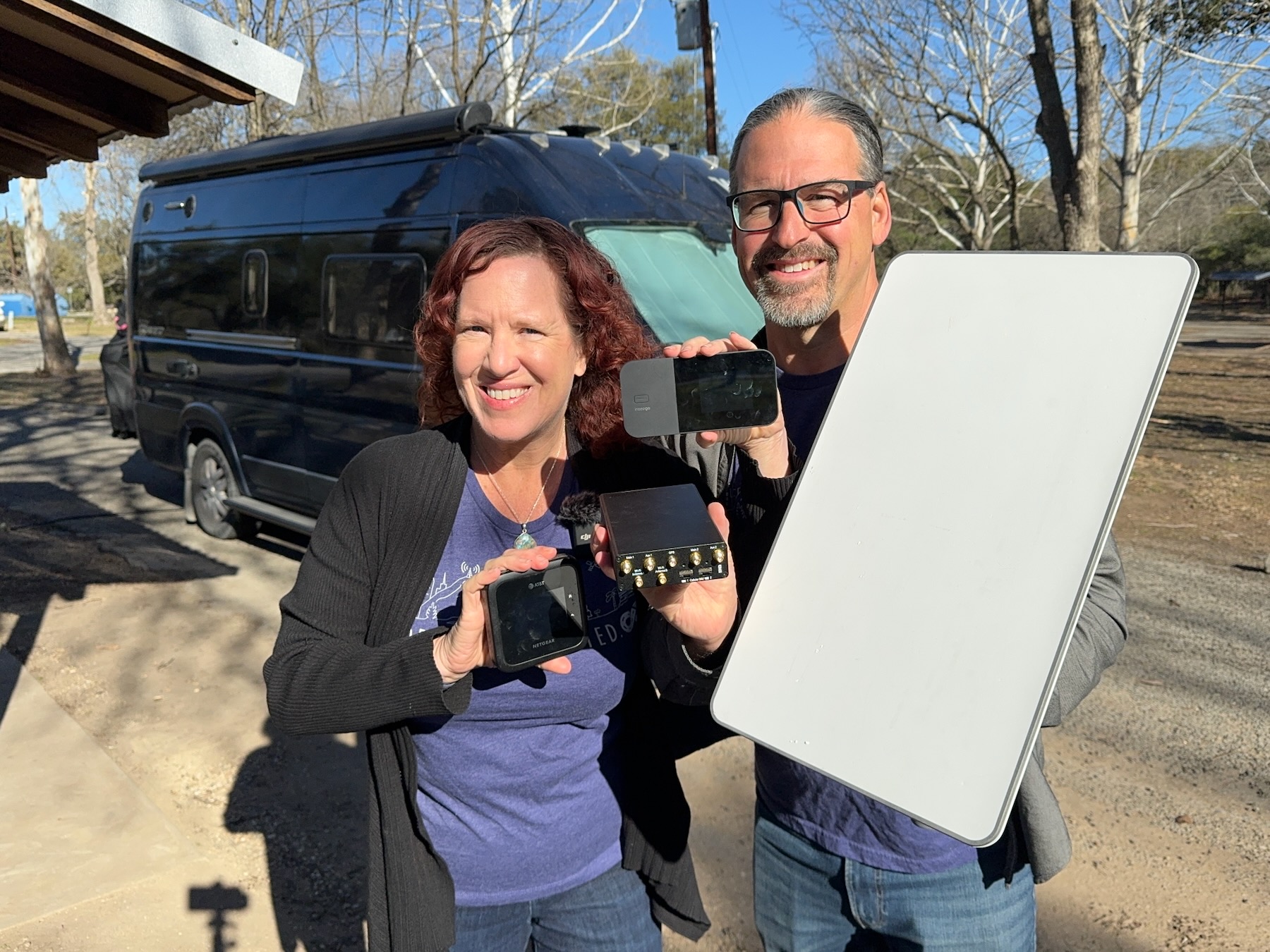
Last year we went out on a van adventure, starting in Florida to Oregon, Arizona and back again. And we recorded what RV mobile internet options we used at each stop.
We’ve shared the travelogues from each segment on this blog if you want to dive into the trip details.
We thought it would also be interesting to track what mobile internet options we used to get a more definitive sense if carrying multiple options is still worthwhile. Or perhaps if it was time to ditch some of the plans or equipment we travel with.

The goal wasn’t to do extensive testing of every RV mobile internet option we travel with at each stop – that would be audaciously time consuming and detracting from actually enjoying our time on the road.
After all our personal goal was lots of bike rides & running, hot springs, time with friends and just in general enjoying life.
Instead, we recorded if the last mobile internet setup we had at the last stop just worked at the new location. Or if we needed to change things up.
Whether it be switching cellular carriers, deploying a higher gain antenna or bringing out Starlink. And we made special notes when heroic efforts were needed.
Last month, we did a rare LIVE video broadcast on our Mobile Internet Resource Center YouTube Channel, sharing the results of the van mobile internet case study. I’ve trimmed down that live cast to a shorter (well, 28 minutes!) produced video, which you can view below.
It goes into more details, especially on the trouble spots and what we did to resolve our RV mobile internet woes :
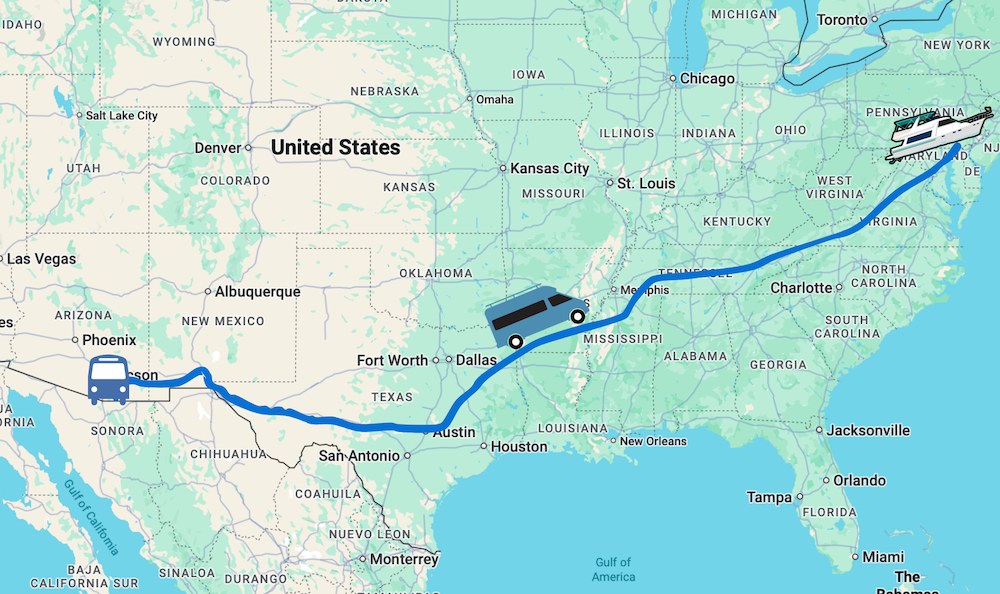
The Mobile Internet Van Trip Travel Route
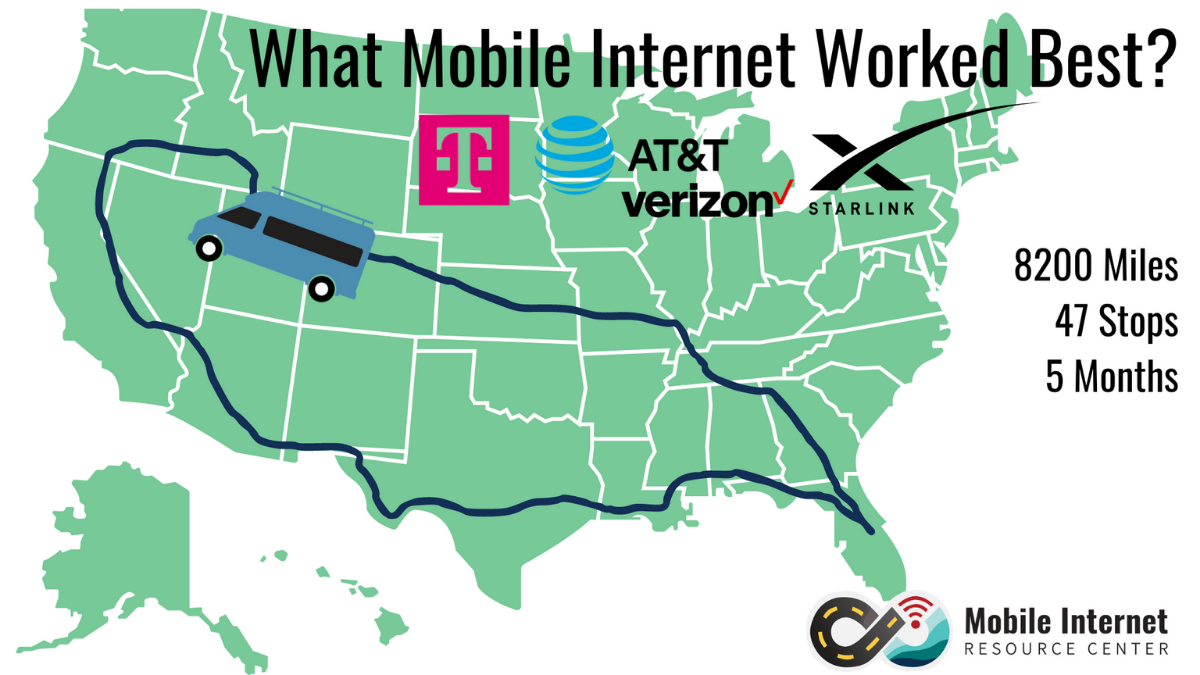
Overall our trip was 8200 miles, 47 unique stops and 5 months out on the road (2 months at our RV lot in Benson, Arizona for the holidays). Amazing adventures, for sure.
Long time readers know that we like to mix things up. We stay in a variety of locations – remote boondocking spots, urban RV parks, Harvest Hosts, hot springs, state park campgrounds, federal parks, and driveway surfing with friends.
We like spots out in the open, and nestled in shade providing trees.
This trip was no different and spanned from Florida to St. Louis, across the Mississippi River, over the Rockies, into Idaho & Oregon, down the Eastern Sierras, a two month stay at our RV lot in Arizona and then back to Florida via Texas.
We visited mostly new to us locations, some of which made possible for the first time because we had mobile internet access thanks to Starlink.
Overall, we feel our trip represents a diversity of locations presenting realistic RV mobile internet connectivity challenges of weak or no cellular signal and obstacles for Starlink.
Most of our stops were just a night or two, and we quite honestly didn’t actually need high performance reliability on most of the stops. So we didn’t put much effort into planning our travels around connectivity. We would mostly pay attention if we had a live broadcast, big upload or video calls planned.
Our Mobile Internet Gear & Data Plans
We continue to maintain our Technomadia Internet Setup page, going over all of the current mobile internet gear and data plans we use in our van, boat and bus. So head on over there if you want more information on any of this stuff.
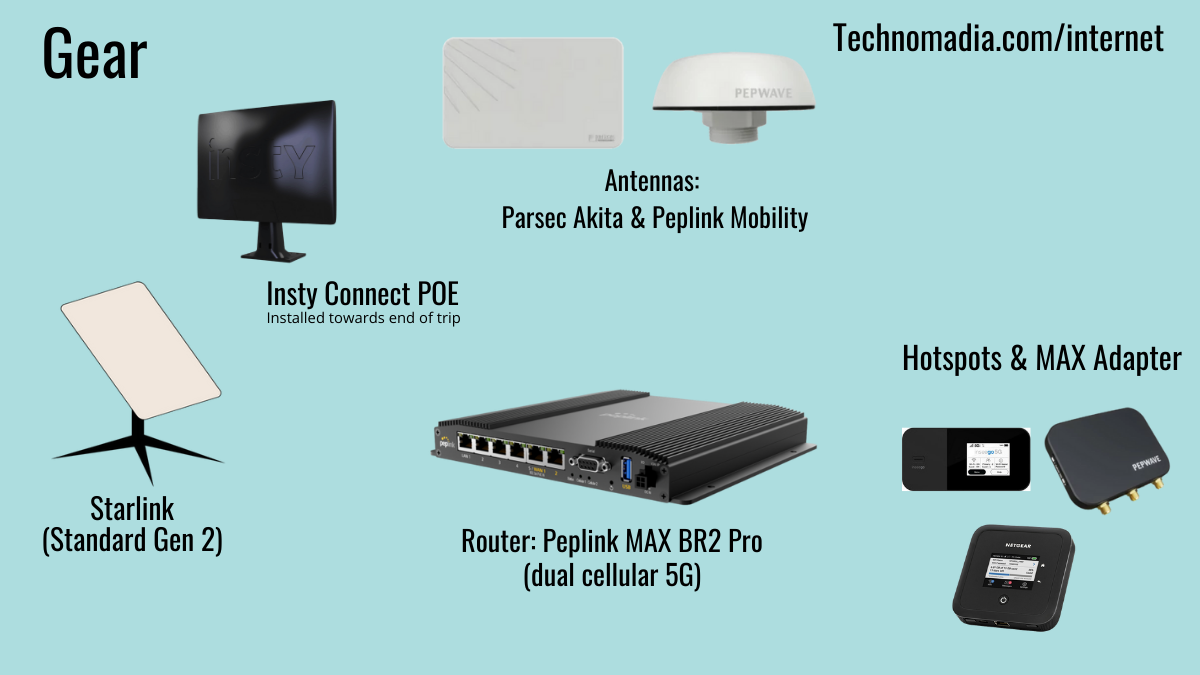
But here’s a quick snapshot of the gear we were traveling with on this particular trip:
- Peplink MAX BR2 Pro –
The RV mobile internet gear we traveled with on this van trip. This router is the center of our setup that brings together all of our mobile internet options, and distributes them to our devices. With dual embedded 5G modems, each with dual SIM slots – we have two cellular connections always on, and two more at the ready. This router also has 3 Ethernet WAN ports, one USB tethering and ability to use two Wi-Fi sources for other internet sources. Each modem in this router is hooked up to a different antenna:
- Modem 1 – Peplink Mobility 42G – a 4×4 MIMO dome antenna for cellular that is permanently mounted on our van’s roof. It also has Wi-Fi and GPS antennas.
- Modem 2 – Parsec Akita – a 4×4 panel antenna that is preferred for better performance to a dome antenna. It is attached to a 20′ telescoping pole from MobileMustHave on the back of the van that rides normally below the site line. When stopped, if we’re not getting the performance needed – we raise the pole.
- Peplink MAX Adapter 5G – using USB, we use this external USB modem as an additional 5G cellular internet source. We use the default paddle antennas inside the van with this device (not ideal in a metal blocking vehicle, but it works well enough).
- Various Mobile Hotspots – We also had a collection of mobile hotspots that we use with the Peplink router, including Netgear Nighthawk M6 Pro (AT&T and Dish), Verizon MiFi X Pro and M2000 (Calyx).
- Starlink Standard Actuated Dish – Gen 2 – formerly just known as Standard, but there’s a new Standard Gen 3 out as of late 2023 that we’ve not yet upgraded to. We don’t have Starlink permanently mounted on our van, so we only bring it out if cellular isn’t cutting it. We mount Starlink to both our telescoping pole and have 75′ of cable to ground deploy it away from the van if needed.
- Insty Connect Squared – Added to our setup after it was released in late 2023, this is an integrated X62 5G modem directly integrated with custom antennas mounted on our external pole. It is connected via Ethernet into our Peplink.
While we have many data plans we’re constantly testing, these are the primary data plans we used on the trip:
-
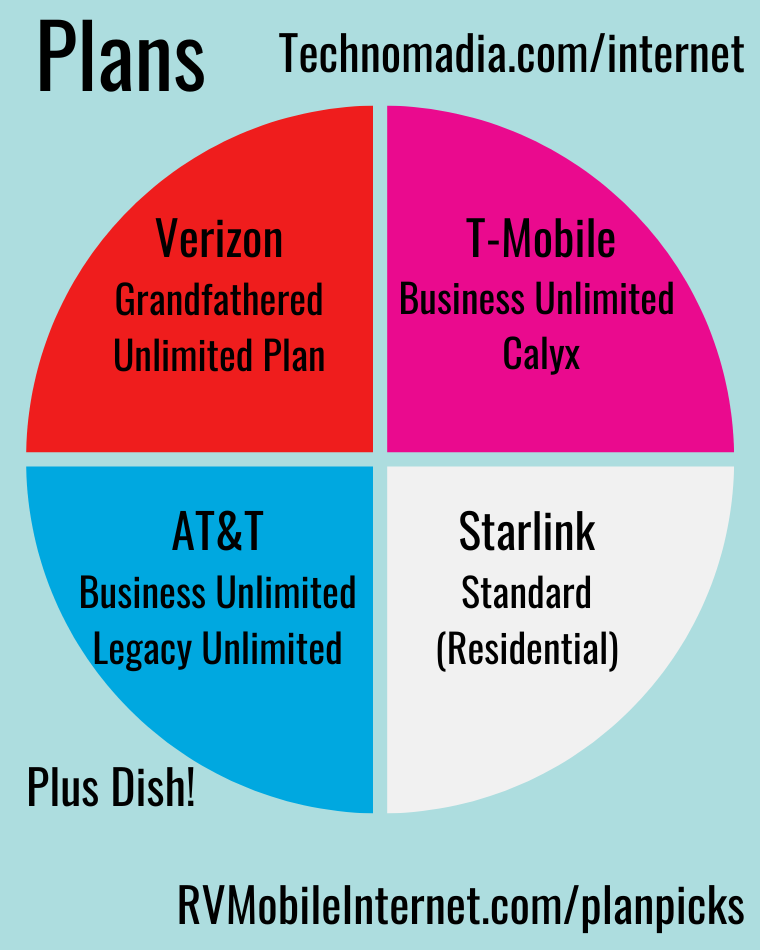
The mobile internet data plans we traveled with this RV van trip. Verizon gUDP – Legacy unlimited postpaid Verizon plan that has unlimited high speed hotspot data, including 5G.
- T-Mobile Business Internet – Similar to the popular T-Mobile Home Internet plan, this plan is unlimited data (but always low priority) but the SIM can be used in your own device – not the provided device by T-Mobile. It’s available for just $60/mo and technically supposed to be used for fixed locations.
- T-Mobile Calyx – Calyx non-profit plan that gives unlimited hotspot data, but must be used in the provided hotspot device (we still have an older M2000). This plan is available today for an annual fee of $500-750, and includes the device.
- AT&T Business Internet– Current generation AT&T 5G business data plan that is unlimited, but always throttled to 50 Mbps. It’s only $65/mo and there are other speed options available.
- AT&T Unlimited Plus & AT&T Mobley – Legacy postpaid unlimited AT&T plans, that is restricted to LTE only.
- Dish Network Project Genesis – Legacy unlimited hotspot plan that roams onto T-Mobile and AT&T when outside of Dish native areas.
- Starlink Standard (Residential) – We generally keep our Starlink on the Standard data plan intended for fixed locations. It’s only $120/month, but has high priority (ie. faster) data than the Mobile plan. We just have to change our service address at each stop we use it – a minor hoop.
If you’re shopping for cellular or satellite data plans, refer to our Top Pick Data Plans page that we keep constantly maintained over at MIRC.
The Van Trip Case Study Mobile Internet Notes
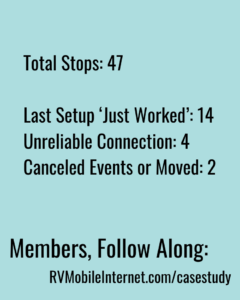 Below is just a quick summary of our case study – our premium members over at MIRC have access to entirety of the case study, including our extensive spread sheet.
Here’s some tallying to see if there were any trends or ‘best’ options during the trip.
- Total stops: 47
- # of times the last set up ‘just worked’ (no tweaking needed): 14
- # of times we didn’t have a reliable experience: 4
- # of times we had to cancel online events or move locations because of lack of Internet: 2
Spoiler alert – there is no single best option!
Even with all of the advanced gear and plans we carry, we still had 2 locations we couldn’t get online and had to make adjustments by moving locations or canceling appointments.
And we had four locations where we couldn’t get online reliably. That’s 8.5% of our stops. That’s not insignificant.
Starlink Summary
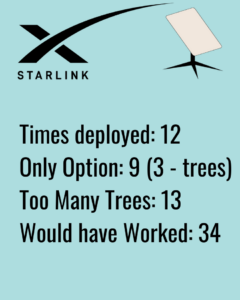 Since we have to deploy our Standard dish, we only do this when cellular options are not cutting it.
So these numbers in no way reflect how many times Starlink might have worked just fine had we not had other options onboard.
Here’s a summary of our Starlink experience this trip:
- # of times deployed: 12
- # of times Starlink was our only option: 9
- # of locations with too many trees to try: 13
- # of locations without trees: 34
Starlink definitely opened up a number of locations for us to visit that we had avoided in the past due to lack of internet options – such as Alabama Hills, Death Valley and Big Bend National Park.
And interesting to note is that two of the ‘Starlink came to the rescue’ locations were spots with trees – so thus ‘coming to the rescue’ meant any connection at all, even with lots of drop-outs.
So often you’ll hear in RVing groups that Starlink is the best – in our personal experience, it’s an amazing tool in our arsenal. But it’s just a tool.
In 27% of the locations we visited, Starlink would not have been a reliable option for our needs due to tree coverage. When doing live broadcasts or hosting webinars, we just can’t have drop outs.
Not to mention all of the other considerations like high power usage, congestion and slower upload speeds than cellular is capable of.
For more on Starlink, check out our guide: Starlink for RV & Boats
Cellular Summary
Cellular was the default option on this trip, and will remain the core of our setup for some time to come.
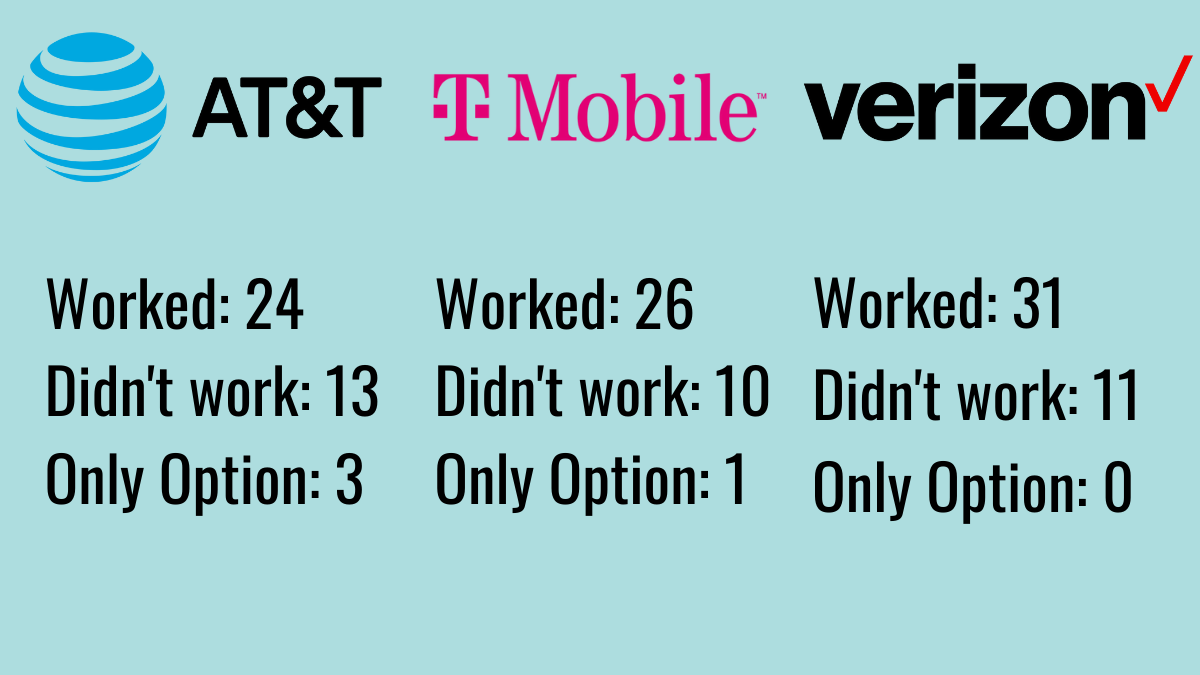
Again, this is not a comprehensive comparison – as we didn’t test every carrier at each location. Only when our last option wasn’t cutting it. We also didn’t make note often enough if 5G or LTE was used to be statistically interesting.
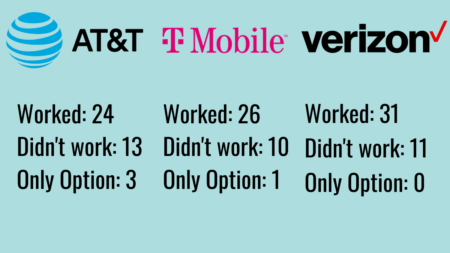 AT&T worked: 24
- AT&T didn’t work: 13
- AT&T only Carrier: 3
- T-Mobile worked: 26
- T-Mobile didn’t work: 10
- T-Mobile only carrier: 1
- Verizon worked: 31
- Verizon didn’t work: 11
- Verizon only carrier: 0
Other interesting notes – we never used our cellular booster or campground provided Wi-Fi on this trip.
RV Mobile Intenet in 2024 Conclusion
Our conclusion on the need for mobile internet redundancy after this trip:
If you need a reliable connection on the road and are hyper mobile – redundancy is still key to success. And even there, you will find locations where you just can’t get a usable enough experience and will need to adjust accordingly.
How many options to you need? That really comes down to your unique mobile internet needs – including your travel style and what you need to accomplish online.
And that’s what we’ve made our professional passion for now a decade over at the Mobile Internet Resource Center. So head on over there, check out the tons of free content made possible by our members.
And if mobile internet is an important part of your lifestyle, consider becoming a premium member to support our efforts and go further with in-depth content, discounts, reviews, alerts and interactive guidance.
Use discount code ‘TechnomadiaRocks’ and you’ll save $10 off a new MIA+ membership.
Thanks for the information. Nicely done!
Thanks for the trip summary, Chris & Cherie, I’m sure a lot of folk will really be interested in your results.
So I did a little number crunching for the hotspots only, based on the chart you provided, to come up with some percentages. Maybe not the most statistically accurate, but perhaps a general guide for those interested.
Percentage worked: AT&T 29%; T-Mobile 32%; Verizon 38%
Percentage didn’t work: AT&T 38%: T-Mobile 29%; Verizon 32%
Interesting how these metrics worked out, based on percentages. . .
Thanks RJ.. indeed, not overly accurate, considering we only tested new connections when what we had working at the last stop didn’t work.