
Life on the road is awesome. We’re so blessed to work and travel, so that we didn’t have to wait for retirement to enjoy this lifestyle.
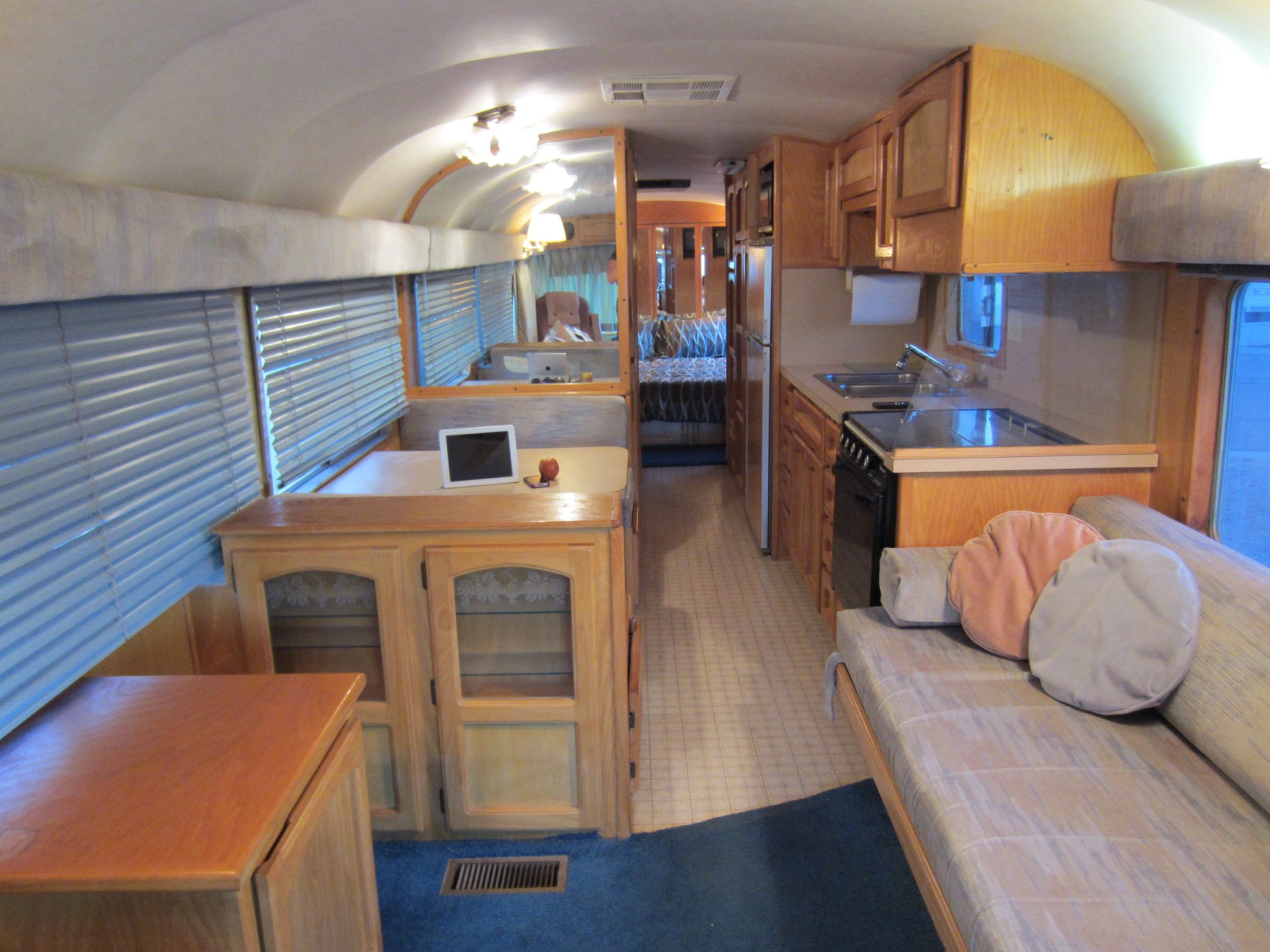
Comfortable working space for two geeks who work online however isn’t a built in feature of most RVs. One of the reasons we sought out a bus conversion was for the increased options for modifications.
We intentionally looked for something we could rip out unneeded furniture and construct our own desk space.
Having now traveled in our 35′ vintage beauty for nearly 6 years, we finally put together a tour of our office – including how we keep our monitors seat-belted to the desk so we have minimal setup at each stop.
For a quick 5 minute video tour, click the play button on this brand new video:
Our Transformation from Dinette to Desk Space
We almost immediately ripped out the dinette in our bus, and began contemplating what would work best in the remaining space. We temporarily repurposed the old dinette table and used tape on the floor to play around with dimensions for the desk:


We lucked into finding a handyman in a campground, and hired him for a day to build us the desk. The cabinet seen that was originally in the front of the bus was moved to be the center support for the desk, giving us storage space.
We intentionally left about a 1.5″ gap in the rear of the desk for running cables.
Next step was bringing in larger monitors as we were tired of just having laptop screens. But we’d need a way to mount the monitors so we wouldn’t have to keep taking them up and down (we move around every few days – we like to minimize our setup time).
While stopped visiting a friend, we discovered he’s a blacksmith – and voila – Chris’ idea of a constructing c-clamps to strap the monitors down was realized.


 The seat belt system was constructed out of random scrap metal found around our friend’s shop, lined with rubber tape & bumpers and then thumbscrews to attach it all together.
In over 5 years of traveling with this setup there’s been no damage to the monitors or desk. We consider that a success!
The beauty of retina screens since have allowed us to downscale our monitor sizes.
Chris has gone back to using a 13″ MacBook Pro as his primary computer and ditched the big 27″ Thunderbolt monitor. He uses a mStand laptop stand that looks great, gets his laptop to a viewable height and works well with the clamping system. (The laptop does get put on the couch while underway.)
I downscaled from a 30″ Cinema Display (connected to a Mac Mini) to a 21.5″ iMac about a year ago.
This means even better office views out our windows! Score!
We also travel with rolling office chairs (currently $99 Costco specials). We use a bungee cord to strap them in while underway that routes from the back of the desk to an attachment point between the center cabinet and desk.
The past piece of the puzzle was.. where to eat? After all, we gave up our dinette for the space.


A later modifications was adding in a pull out table between the workspaces that we can use for happy hour snacks or a small meal. We often just move the keyboards and eat at our desks. Or dine outside on the a picnic table when the weather is nice.
Our Canon PIXMA Printer lives underneath the desk on top of the cabinet. It comes out for those rare times we need to actually print something. It’s been a hardy little companion over the years.
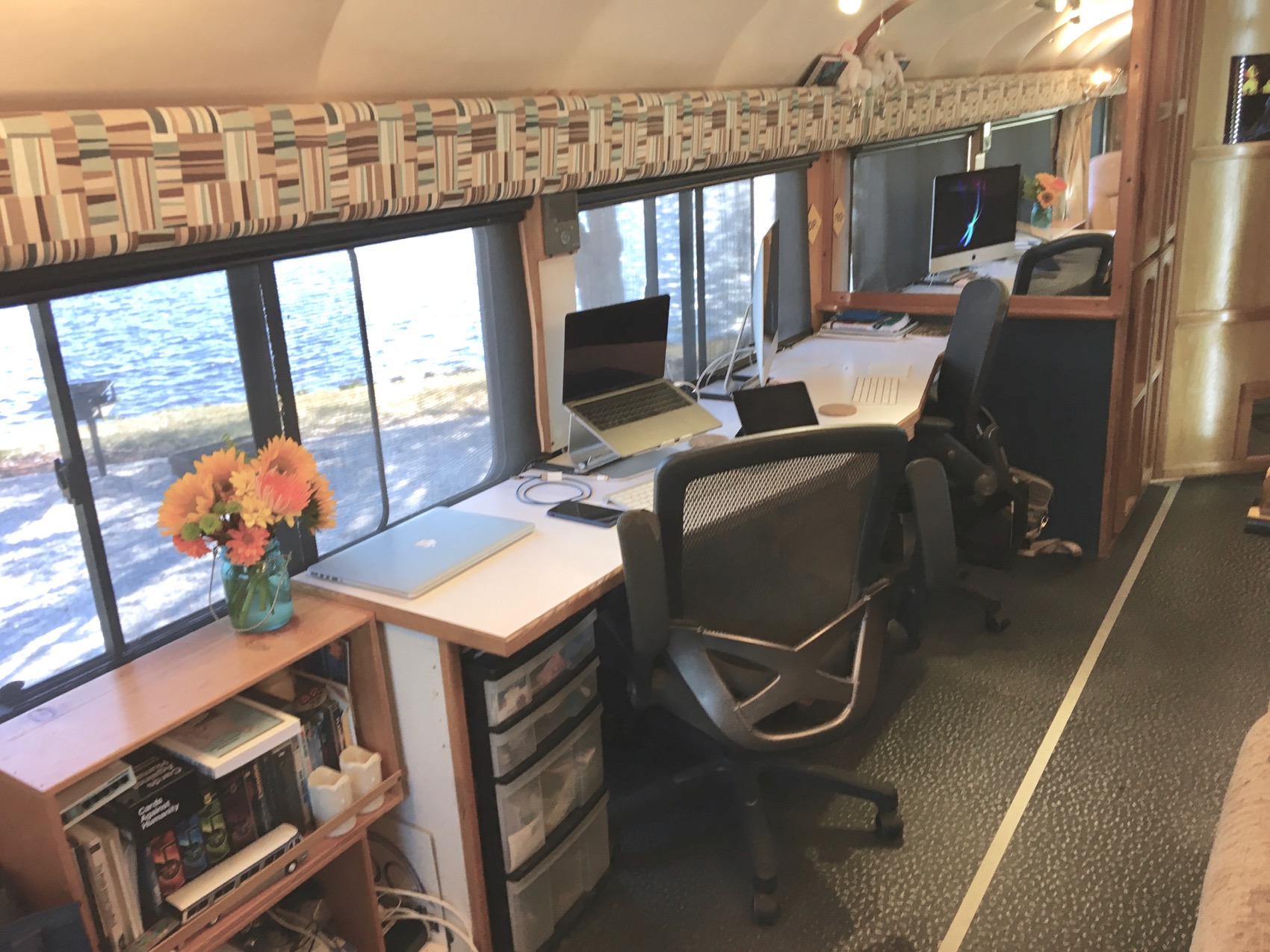
So there you go, how our office space comes together.
For More Links & Information:
RV Workspaces Series – Case Studies of other RVer’s workspaces
Our RVing Gear – Listing of the gear in our bus, including our computing gadgetry
My boyfriend and I are interested in becomoing full time RVers. My question is about the Internet. How do you make sure you have a stable connection? I already work from home but need 8 – 10 hours of a reliable connection.
Hi Anna… our ‘day job’ is actually helping RVers do exactly that. Here’s a link to our overview guide to help get you started with your research: http://www.rvmobileinternet.com/overview
Thank you both! This was a wonderful, timely, lean and informative post.
The more people work remotely from the road the more they will demand dedicated desk spaces. Ditto for those who use their computers a lot. We travel in a 27-foot Airstream. I store a monitor in the large storage space next to the refrigerator in a padded jacket. I have to place it on the dinette and attach it to my laptop to give me a two-monitor set-up. It’s enough of a hassle that I don’t do it unless we’re going to stay somewhere for a few days I need that set up. I don’t know that I’m ready to take out the dinette, but I would love to see what other Airstreamers have done to give themselves a permanent desk.
Check out Ramona Creel’s office setup in the workspaces series linked above – they did some mods to their Airstream for a desk solution. The Snowmads also shared their Airstream work situation, but it wasn’t a permanent setup for them.
I did and thanks. That is certainly a lovely job, but the trade-off is that it leaves one with a single bed. Perfect if u r single, but If there is more than one person it means making up and taking down another bed daily. Since I use my bed on a more daily basis than a second monitor, Thats a bad trade off for me.
Yup, small spaces present challenges for sure. One reason we ended up going larger to get a comfortable dedicated office space without converting anything. Before that, we had to convert bed-to-table all the time in our smaller trailers. It’s all about trade-offs.
Absolutely love the desk setup!!! It’s exactly what I need to do in our Class A. Are you able to provide the dimensions of the table top? Great job you two!
It’s best to measure your space available – as ours was custom designed to fit our space. Each RV is very unique.
I just found your blog last night and thought your motorhome looked familiar. I think you have been following me for the last couple of weeks because I saw your rig at Gamble Rogers. (I was in Site #19 there.) Now I am down the way from you at Site #10 in the Tioga Ranger!! I drove past your rig this morning when I went out to visit urgent care for a minor problem and to get some groceries. I chose not to have a toad, so I take my whole rig out, but I am used to doing that. Makes putting groceries away easier when you bring your refrigerator to the grocery store!! I do have an electric bike for zipping around campgrounds, however.
I teach college classes online, but my office is my old, leather Laz-y-boy recliner, just as it has been for over 12 years. (Taught in a college classroom part-time for 13 years, and now have been teaching online for the past 15 years.) I had the dealer take out the dinette when I bought my motorhome in 2012 to make room for my comfy recliner. I have been full-timing as a solo older woman traveler for almost five years now and love the life.
Nice to see other people working on the road. My teaching is only half-time, but I am retired from my regular job and supposed to be taking it easy. Ha!
Might stop by and say hello if I see you outside tomorrow. You are welcome to knock on my door, as well.
Hi Judy… I don’t believe we’re the bus you’ve spotted. We haven’t been to Gamble Rogers since last May, and in the current campground we’re at (Ortona South), spot 10 looks to have a 5th wheel in it? (Could be wrong, there’s trees between us and it).
Anyway, if we are in the same campground – we are tied up all morning with advising calls. So we’ll likely be inside a lot.
Then I confused your bus with a similar one at Gamble Rogers, but #10 is a Tioga Ranger (me) in Ortona. The 5th wheel is next door. I would never knock on your door because I do know you are busy. My teaching schedule is much more flexible, thankfully.
Yes.. we walked by during a break in calls and saw the Tioga parked there. We generally peak out again before sunset to watch the otters.
Nice! Thanks for sharing! You are an inspiration to others who need to figure out work spaces in their RV.
Thanks, guys. Loved the tour. What’s the expression? Invention is the mother of necessity. I loved the monitor set up. I’ve seen a lot of people attach the adjustable arms but I love how clean your set up looks. Nothing to obstruct the beautiful view from the office!.
Adjustable arms are definitely a great option if the space is available. We had done that in our last trailer. But we didn’t have wall space in the bus to consider that.
I have followed your blogs for years and love the way that you have fearlessly (or so it seems!) upgraded / modified / improved / changed things in your bus to suit your needs, desires and lifestyle. Not only have your blogs, technical information and lifestyle / traveling posts inspired us to the RV lifestyle, it also helped us greatly in deciding what floor plan we wanted to have. After years of attending shows, visiting dealers and studying manufacturer websites we determined that we really liked the Winnebago Adventurer 37b floor plan, in part because it was built (discontinued after 2008) with a larger BR which contained a built-in desk. Also following your advice on buying an older used RV vs. going broke buying new (one of the best pieces of advice ever!) last June we found a 2005 model at PPL in Houston for a good price. So with the savings from buying this older model, and following your example we plan on doing some mods by making our office desk larger, installing new flooring, enlarging the bath vanity, etc..
I am surprised that more people do not tackle personal mods to their RV. Certainly many homeowners do this a lot, and it some ways it is even easier in an RV (due to the smaller scale), especially if your are a handy DIYer like myself, or have some friends to help. In researching new models it is amazing how similar most new RV floor plans are to each other, and in many cases some small tweaks could greatly improve livability / usability if people made them.
Anyway – before jumping in on our owns mods we wanted to get some more experience in using our first RV (we were total newbies), so we have taken a few shorter trips. Then 2 weeks ago we traveled to Quartsite – again. We were there last year in our car to check things out (we just missed finding you and the Xscapers there), so now that we had our own RV we wanted to try some boondocking in the desert. To help ensure a meet-up we joined Escapees, found the Xscaper meeting point on Dome Rock Rd East. – – but when we got there they had already moved to “an un-disclosed location” (again). We searched all through the Escapees site but found no reference anywhere as to where the Xscapers had moved to – very frustrating. But we did find reference to another Escapees BOF group – the Boomers, and they were set up only 2 miles into the desert from the old Xscaper location. So we drove there and joined about 150 others for 5 nights. It is a great group and we learned a lot about RVing, boondocking, how we wanted to do some mods, etc.. And we learned that we made the right choice in our Winnebago and that we really loved the lifestyle.
Sorry to go on and on – but I wanted to let you know how much an inspiration and influence you have both been to my wife and I into RV living. I greatly appreciate your bus customizations and the technical sharing or those, and love following your travels. Good luck in finding a Looper boat for your next adventure. I look forward to following your blogs and Vlogs on that.
Glad you got to meet up with the boomers and get some boondocking in! Sorry that the Xscapers eluded you. I know they published the exact coordinates in their Facebook Convergence group (and maybe RVillage?). This year the entire convergence was a public event and they weren’t hiding – know lots of folks who just popped in to join them.
That’s a sweet set-up and my husband would love it if we were on the road like you guys. He’s an IT geek, too 🙂