We're often asked what cool stuff we carry with us to enable and enhance our mobile lifestyle in our boat and RV. From our tech to our toys. Directly below are blog posts we've done going over some of our favorite acquisitions. Scroll below for listings our mobile gear organized by category.

Technomadia
Adventures in Nomadic Serendipity

Footer
Fleet Status & Travel ‘Plans’
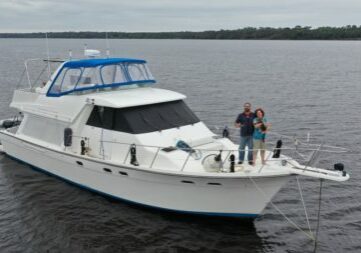
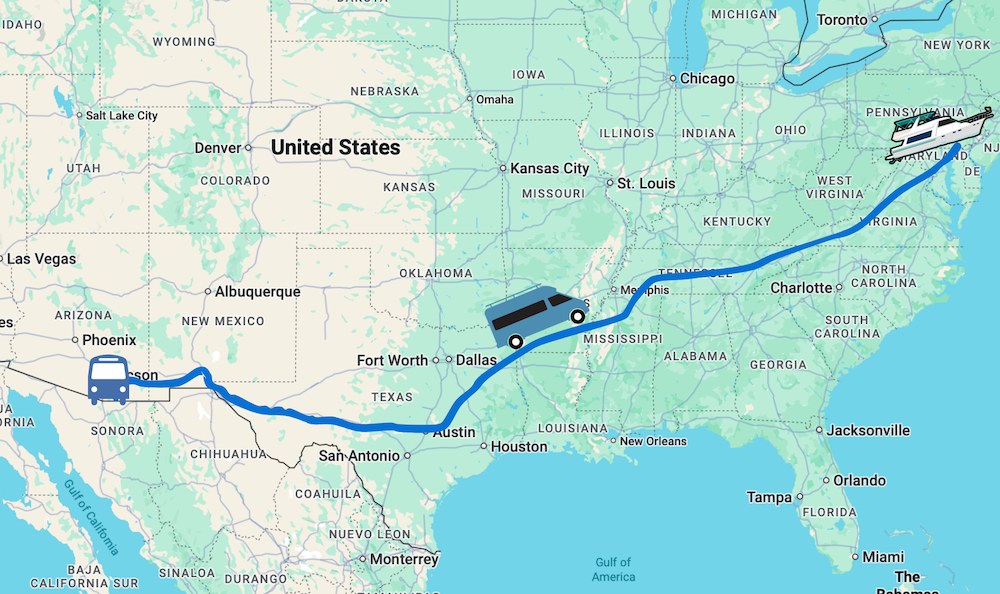
Boat: In storage - Maryland
Bus: In Storage - Benson, Arizona
Van: In transit - AZ to MD
View our full Travel Map
Bus: In Storage - Benson, Arizona
Van: In transit - AZ to MD
Current Travel Segment:
Making our way across country back east to get Y-Not ready for the cruising season.Are we coming your way?
Be In Touch!View our full Travel Map
I am interested in knowing how/ where you store your sewer hose. I would also like to store my fresh water hose in the regular sewer hose storage in my new Travato like you do!
The previous owner installed a sewer hose tube under the rear bumper of our Travato. Gives us a full size hose, which we love.
Hi guys! I subscribed to your YouTube channel last year when I was debating about full timing on a boat vs in an RV. I knew more about hitting the road, so I started there, but plan to also hit the water in the next year or two. September 2019, I moved into a 41′ Coachman SportsCoach RV pulling a 30′ trailer with my car & motorcycles inside. Your channel & website have been great resources and I’ve referred others to you as well. Seventy+ feet on the road is super long and although I’ve driven from Georgia to Arizona and back without incident, I consider myself lucky on several fronts (only 1 flat tire on the trailer upon arrival in Arizona and no backup issues because I didn’t backup much). Using your recommendations, I’m purchasing several items on Amazon. My biggest challenge is in selecting a backup camera system that I can view from my driver’s seat and that can display the view behind my trailer. I already have an Arlo camera setup to view the inside of my trailer for security reasons and to check my load while driving over potholes, but the Arlo cameras have a delay over my cellular connection to my iPhone, which is too long for using Arlo for backing my rig up. I have a backup camera built into my RV to help with trailer hookups, but no way to see behind my trailer, which would be very helpful in a lot of situations. I currently have an Axxera AVM101 DualMirror 2-way with BlueTooth that displays my RV backup camera and plays my iPhone Pandora via BlueTooth. I like the RV Garmin GPS units with built-in dashcams as they account for RV size/weight/height for route selections. The Garmin RV 785 has all that and is compatible with the Garmin BC 40 backup wireless camera, however, the wireless camera only has a 25′ range and my rig is a total of 70′ long. I’m seeking options. Perhaps to make the Garmin RV785 work with the BC40 wifi camera (i.e. range extender, or similar option) or if there’s another compatible backup camera to pair with the Garmin RV 785. I’m also open to completely different solutions, but I’d like to keep the quantity of additional displays on my dash to a minimum (GPS, TPMS, Backup Camera, iPhone, Radio). Ideally, I’d like to find a backup camera that is compatible with my built-in Axxera backup camera and then simply add the Garmin GPS RV 785. I would greatly appreciate any advice you can offer on this subject. Thank you very much!
We honestly aren’t up to date on what is on the market – we did our last RV electronics upgrade back in 2015. Good luck.
Im curious.. is all your equipment insured? By your regular vehicle/bus insurance, or do you need additional business or personal items coverage?
We have a special rider on our full timer’s RV insurance for replacement value on the contents.
How do you mount your Apple Monitors so that they are accessible yet secure for travel? Do you have photo?
I use an IMac 27 and carry it boxed, and only unbox it when we are staying longer than two days. The rest of the time we use PC’s and IPads.
Thanks,
Hank
Hi Hank – here’s our workspace setup that includes information about the mounting system we invented: https://www.technomadia.com/full-time-rving-workspaces/technomadia/
Hi,
Thanks for all this great info. I have an iPhone with the grandfathered unlimited data and an iPad that has limited data. How did you get unlimited data on your mini? Was it just something offered when you bought yours? I’ve been thinking about dropping my iPhone and eventually getting a mini but I was wondering if I should do all that and the same time and try to get the unlimited data transfered to the mini. Is that even possible? I didn’t think it was but I thought you might know a way.
Thanks,
Pam
For the first two months the iPad came on the market back in 2010, AT&T had an unlimited plan… if you kept it since then, you can carry it forward to newer iPads. Which is what we’ve done. If you want the plan, you have to purchase one from someone ready to give it up. Last I checked, the plans themselves were selling for $600-800 on eBay (no iPad included).
Hey guys! I have a question for you. I currently have a Verizon USB720 aircard that is unlimited (but its 3G) and has no contract. So I pay month to month for it about $59.99. I wanted to know would you turn that in and upgrade to a 4G device or keep what I have. Verizon is offering me a credit to upgrade but I’m not sure that I would want to loose my unlimted. I currently have the aircard plugged into a CradlepointMBR95 router to open it up for my wifi. If you recommend to keep it is there a way to increase the speed or maybe strength of that aircard any?
The right answer for you will all depend on what your Internet needs are, it would be impossible for us to make a firm recommendation. We just published a 85 page eBook on this subject that you might want to check out. We go over many of the considerations and options, including the grandfathered in unlimited plans. Check it out: https://www.technomadia.com/Internet.
We used to have a USB720 with unlimited 3G with Verizon before they upgraded us for free to a mifi 3G, also unlimited. Verizon has since (spring 2012) upgraded us to a mifi 4620 4G jetpack with 20GB of data per month for the same $59.99 per month we were paying before.
All that to say that Verizon customer service may be able to help you out with a similar deal. The other nice thing is that Verizon lets us put it on vacation stop as often as we need to. This comes in handy when we return to Canada for the summer. We spent last winter in Sebring, FL in one location that just didn’t give us great 3G reception at all. We called Verizon and they put us on vacation stop without any problems at all.
We use the MBR95 as well and find it great for connecting to campground wifi using the wifi as WAN feature. That way we don’t have to use multiple wifi site logins on our laptops, just the same old SSID we always use.
We have deactivated our motorized rooftop Datastorm dish because it just wasn’t worth the money to keep it going for the miniscule daily data allowance they provide. The oval works great for receiving Shaw Direct satellite TV though :).
I just picked up technomadia’s ebook the other day and it is well worth the investment.
Hey guys! Fantastic life, great gear! We too, fulltime and love it! Been at it 3.5 yrs. now. Is there really any other way to live? We are considering adding the SeaEagle also. Would you be kind enough to let me know just how small it stows away at? We have all the tech, also. Millenicom, too. We try to convince the old timers how much the gear and data plans will save them and enhance their lives. Just got Jimmy the 77 yr. old traveler to get in with an ATT tablet! Loves it! Great job getting the word out! Hope to hear from you soon.
Hi Marshall. The SeaEagle packs down pretty much as advertised. Have been very happy with it so far. Best wishes!
Thanks and be safe out there.
Does the Top Signal 55 have a pretty good range inside your RV? I am debating between it and the Wilson SOHO. The Wilson has a good range but does now work while being mobile.
thx!
The internal range is more dependent on the inside antenna and incoming signal itself. We keep a couple different kinds of internal antennas on hand for just this reason, and adjust as needed depending on the signal being boost. Our omni directional one, when we have a decent enough signal, gives a decent range in the living room/office of our bus. But more often than not, we just use the flat ‘card’ antenna which is attached to our data card for maximum boost.
The wife and I are software developers and just starting to go full time on the road. Last stop we was at had a poor wifi signal at the park and our Sprint and ATT was only at one bar.
I have added a Verizon card to our equipment and purchased the wifiranger and Top Signal 55.
Hopefully the next stop we will have better connectivity.
We know the frustration well of trying to keep connected while running a software biz. It’s gotten significantly easier and more reliable in the 6 years since we hit the road. Back then, we were lucky to maintain a 1XrT connection in some places, and thought that was fabulous!
Redundancy is a good idea for having lots of options to get online. But there’s only so much you can so sometimes.
The most important component of your connectivity arsenal is setting your expectations to reality. Park with a great view – when the internet is annoying, that’s when you break out the wine and cheese, and toast to how awesome your life is. 🙂
Hi Chris & Cherie,
Our family of four is about to go full-time. Date is set for Feb 15th! I do all my work on my laptop, and am trying to figure out how to ensure I have connectivity whereever we go. I have a 4G Verizon card with 10gig. And, I assume there may be some WIFI available. But, what if we’re boondocking in the wilderness? Do we need to get a sattelite connection? I called HughesNet twice, and they clearly state that they’re not for RVs. Everyone I’ve talked to or found on the web just uses Verizon and WIFI. Maybe I’m worrying unnecessarily.
Do you have any advice?
By the way, we’d love to see your 1961 GMC one day!
Thanks!
Bill
Hi Bill –
Welcome to the road!
If you need to keep connected where there is no signal, then yes – a satellite dish is highly recommended. We have one in our arsenal on a tripod that we can set up when we need it. Hughes does not officially support it on RVs, the key is purchasing used equipment and activating via a vendor, or fighting your way through their customer service. You’ll need to make sure you buy an older model that is not spot beam, and avoid getting into a contract. We regularly suspend our service when we know we’ll be in cell connectivity areas for a while. Another option is a roof mounted system from Motosat.
We cover this topic is a bit in our Mobile Connectivity Article:
https://www.technomadia.com/2011/09/10-tips-to-keep-connected-us-mobile-internet-options/
For cellular, highly recommend having something on AT&T’s network too. Verizon has pretty good coverage, but there have been plenty of times where we could only get online via AT&T. Redundancy is key to keeping connected as much as possible.
Best wishes!
– Cherie