
It’s been a few years since we updated our list of favorite mobile apps for RVers.
We just came off an extended RV trip for the winter season, and it was fun to see which apps we still love and new apps that have hit the market.
So here it is, our updated list of mobile apps we consider our essentials to complement our road tripping lifestyle (note, we are an all Apple household, but if there’s an Android version we’ve listed it too.).
Please note that we are also app developers and some of these apps we wrote to solve problems we encountered in our own travels. We have clearly disclosed which they are – and aside from those, we paid for all of the apps listed and these are unsolicited reviews. Just our honest opinions. But, if you do opt to buy any of these apps off our recommendations, some links below are iTunes affiliate links and we will get a tiny cut.
First, here’s a quick video overview of these apps with some brief demos:
Selecting RV Parks & Campgrounds
There still does not seem to be one single app that finds all campgrounds — but there are some very useful resources out there. We find ourselves using a combination of apps depending on the situation and type of camping or overnight parking we’re looking for.
| Allstays Camp & RV – $9.99 |  This is the ultimate RVing resource guide for finding not only campgrounds, but other RV services and overnight stops. Its campground database includes RV resorts, military FamCamps, public campgrounds, overnight parking options (including which Walmarts you can’t stay overnight at), etc. It also includes places that service RVs, dump stations, propane fills and service centers. In addition, it has low clearance bridges marked, rest areas, road grades, construction alerts and tracks some of the basic state laws. Updates are free for the life of the product, and they seem to regularly improve and add content. They have other versions as well that provide subsets of their data, for instance if you want the list of Walmarts only, and offer an online subscription option. This is the ultimate RVing resource guide for finding not only campgrounds, but other RV services and overnight stops. Its campground database includes RV resorts, military FamCamps, public campgrounds, overnight parking options (including which Walmarts you can’t stay overnight at), etc. It also includes places that service RVs, dump stations, propane fills and service centers. In addition, it has low clearance bridges marked, rest areas, road grades, construction alerts and tracks some of the basic state laws. Updates are free for the life of the product, and they seem to regularly improve and add content. They have other versions as well that provide subsets of their data, for instance if you want the list of Walmarts only, and offer an online subscription option.
Alternatives: RVParky seems to be a popular (and free) alternative that a lot of folks like. |
| Campendium – Free |  Campendium has become our go-to website for campground reviews – we love that they cover commercial RV parks, public campgrounds and known boondocking gems. Our favorite feature is that they ask folks to rate the cellular signal for each of the four carriers – perfect for us connected nomads! In the past year, they have finally launched their own app – and we loved utilizing it in our recent travels. Campendium has become our go-to website for campground reviews – we love that they cover commercial RV parks, public campgrounds and known boondocking gems. Our favorite feature is that they ask folks to rate the cellular signal for each of the four carriers – perfect for us connected nomads! In the past year, they have finally launched their own app – and we loved utilizing it in our recent travels. |
| Harvest Hosts – Free (requires membership)iOS | Android |
 We love our Harvest Hosts membership ($49/yr) – it allows us to stay at unique places like wineries, breweries, museums and farms. Since we do most our planning on our iPhones, logging into their website to research options meant we often missed opportunities. Now with their new app, we can easily scope out our options. During this last RV trip we stayed in more Harvest Hosts locations simply because the app made it so much easier. We love our Harvest Hosts membership ($49/yr) – it allows us to stay at unique places like wineries, breweries, museums and farms. Since we do most our planning on our iPhones, logging into their website to research options meant we often missed opportunities. Now with their new app, we can easily scope out our options. During this last RV trip we stayed in more Harvest Hosts locations simply because the app made it so much easier. |
| Passport America – Free (requires membership) iOS | Android |
 If you’re a Passport America member, this app is a no-brainer to have on your mobile device for quickly searching if there are member clubs on your route. If you’re a Passport America member, this app is a no-brainer to have on your mobile device for quickly searching if there are member clubs on your route.
We recommend Passport America membership – the club gets you access to 50% discounts at RV Parks across the country, and the $44 annual membership price will pay for itself with just a couple nights stays. We mostly utilize their campgrounds when making transitions between our destinations to dump/fill tanks and recharge. |
| Ultimate US Public Campground Project – $3.99 |  This app is a great resource for finding public campground options, which is our general preference. It lists state parks, national parks, municipal parks, COE, BLM lands, boondocking spots and more. You can also use the online version for free, download the Mac app or a POI database for your GPS. This app is a great resource for finding public campground options, which is our general preference. It lists state parks, national parks, municipal parks, COE, BLM lands, boondocking spots and more. You can also use the online version for free, download the Mac app or a POI database for your GPS. |
| Coverage? – $2.99
by Technomadia |
 Essential in planning where we’ll camp is knowing if we’ll have cellular signal or not. So we created an app for that! Essential in planning where we’ll camp is knowing if we’ll have cellular signal or not. So we created an app for that!
The app overlays the carrier’s maps so you create your own personal coverage map for the carriers you have (Verizon, AT&T, Sprint and T-Mobile). We use it to help plan our routes, overnight stops and extended stay. Each carrier’s maps are stored offline, so even if we have no cell signal — we can find out which direction to head. The app gets free updates throughout the year, and we now offer an in-app subscription option for quarterly higher resolution HD maps. Free Trial: We now offer a free trial with Coverage? Lite on iOS (the new Android version starts in free trial mode). For more on planing your RV Travels around connectivity (our ‘day job’): |
| US Public Lands – $2.99
by Technomadia |
 Other resources list known boondocking locations – which makes it super easy to find great locations (which means everyone else can find them too). But sometimes we like to scout out lesser known options which requires a bit more research. We created US Public Lands to overlay BLM, Forest Service, NPS and public land boundary maps. Other resources list known boondocking locations – which makes it super easy to find great locations (which means everyone else can find them too). But sometimes we like to scout out lesser known options which requires a bit more research. We created US Public Lands to overlay BLM, Forest Service, NPS and public land boundary maps.
It helps us in the search for finding options a bit more off the beaten path or just helps us confirm we are indeed on public (not private) land. For the full story of this app and an example of how to use it. |
For more in how we find camping options:
Guide to Finding RV Parks, Campgrounds and Boondocking
Navigating to Get There
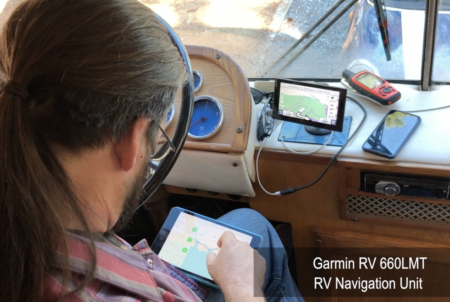
We’ve tried a lot of navigation apps and devices out over the years, but we mostly just use the built in map apps on our iPads and iPhones. Since our bus is only 11.5′ tall, we don’t worry too much about low clearance spots.
We do have a Garmin RV 660LMT GPS unit that we keep running for a quick visual reference (it also doubles as the screen for our rear view camera) – which does a decent job of alerting us to non-RV friendly routes. But quite honestly, all RV-specific navigation options we’ve tried have their share of routing us down bad routes – so we prefer to do our own research in advance.
Here are the apps we use while enroute:
| Apple’s Maps – Free |  The default maps program by Apple is actually pretty good. It has turn by turn directions, satellite views, voice response via Siri and more. This is usually the first app we load for getting general directions. The default maps program by Apple is actually pretty good. It has turn by turn directions, satellite views, voice response via Siri and more. This is usually the first app we load for getting general directions. |
| Google Maps – Free |  We also love the Google Maps and generally are running this along side Apple Maps. We also love the Google Maps and generally are running this along side Apple Maps.
It’s “fun” when Apple and Google’s direction disagree with each other. |
| InRoute – Free (with in App purchases) |  This app helps us optimize our driving day, by scouting out ahead for elevation changes, curviness, weather conditions and things along our route. We plug in our destination for the day ahead, and know before we head out which routes to take to avoid adverse conditions. We love the elevation profiles it gives us, so we can avoid routes we don’t feel like crossing with our vintage naturally aspirated 2-stroke diesel engine. This app helps us optimize our driving day, by scouting out ahead for elevation changes, curviness, weather conditions and things along our route. We plug in our destination for the day ahead, and know before we head out which routes to take to avoid adverse conditions. We love the elevation profiles it gives us, so we can avoid routes we don’t feel like crossing with our vintage naturally aspirated 2-stroke diesel engine. |
| GasBuddy – Free |  Want to find the cheapest fuel prices? GasBuddy is your app. You can view user submitted fuel prices to help locate the cheapest places to fill up. But, as it’s user submitted information – do use caution. Some listings even include photos so that you can determine if the station is RV-friendly. Want to find the cheapest fuel prices? GasBuddy is your app. You can view user submitted fuel prices to help locate the cheapest places to fill up. But, as it’s user submitted information – do use caution. Some listings even include photos so that you can determine if the station is RV-friendly. |
| State Lines – $4.99
by Technomadia |
 We developed State Lines to fulfill our own desire for a single resource for over 50 laws and regulations that change as you cross state lines. We use it frequently as we cross state lines to find out if gas taxes will be cheaper in the next state, if we can overnight at rest areas, if we can buy beer in grocery stores on a Sunday and other such information. We update the app generally once a year with a refresh of the data. We developed State Lines to fulfill our own desire for a single resource for over 50 laws and regulations that change as you cross state lines. We use it frequently as we cross state lines to find out if gas taxes will be cheaper in the next state, if we can overnight at rest areas, if we can buy beer in grocery stores on a Sunday and other such information. We update the app generally once a year with a refresh of the data. |
| RoadTrip – $6.99 |  We use this app to track our fuel fill-ups, fuel economy and maintenance logs & costs for both our RV and our toad. It allows you to quickly create custom snapshots of your expenses (such as ‘Repositioning from Florida to Texas, Winter 2018’). It even gives us a break out of what our costs are on a daily and per mile basis. We use this app to track our fuel fill-ups, fuel economy and maintenance logs & costs for both our RV and our toad. It allows you to quickly create custom snapshots of your expenses (such as ‘Repositioning from Florida to Texas, Winter 2018’). It even gives us a break out of what our costs are on a daily and per mile basis. |
Stuff Once You’re ‘There’
Once you pull into your destination, here are some of our favorites apps for getting settled into camp and discovering what is around us to explore:
| Compass – Free
iOS (pre-installed utility app) |
 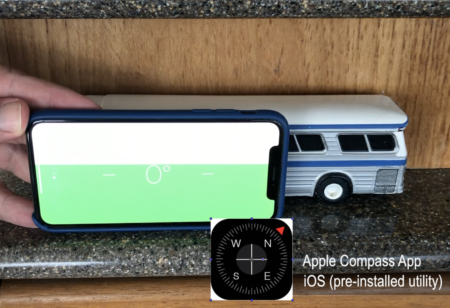 We tried out the LevelMate Pro recommended by our friends over at The RV Geeks – we got it installed but we never got past tweaking the calibration. We tried out the LevelMate Pro recommended by our friends over at The RV Geeks – we got it installed but we never got past tweaking the calibration.
Why? Because the built in bubble level inside the Apple installed Compass utility app is just so darn easy to use (swipe the compass to the right – viola – there’s the level!) It’s been good enough for us. Our airbags on our bus tend to settle to fairly level on their own after a day or so, otherwise we use blocks. If we’re off level a bit, well, maybe living part of the year on a boat just makes us not so sensitive to it? |
| Speedtest by Ookla – Free |  Perhaps even more important than being level, or any other amenity is – how reliable is the internet?!? Perhaps even more important than being level, or any other amenity is – how reliable is the internet?!?
So before we get too settled in we run some speed tests on all of our options. Afterall, bars/dots really don’t tell you how fast your connection might be. We like the Speedtest app by Ookla. We connect to each option we have on board (with and without boosters/antennas) to help find tune the minimum speeds we need For more on understanding your cellular data performance (part of our ‘day job’): |
| RVillage – Free |  Ok – we’re level. The intenet is blazing away. Next in setting up camp is checking into RVillage so we can see who else might be in the campground to make some new friends. Ok – we’re level. The intenet is blazing away. Next in setting up camp is checking into RVillage so we can see who else might be in the campground to make some new friends.
When we helped launch RVillage back in 2014, it was all web based. Now the app makes it super easy to remember to check in to your new park and start meeting people – it can even auto detect your current location. With nearly 100,000 active members – RVillage is now THE social network for RVers to connect on the road – and it’s free to join. |
| Yelp – Free |  This one is probably obvious, but just in case you haven’t found it yet, we’ll mention it again. Yelp is a giant database of restaurants, hotels, campgrounds, hair stylists and more – all with extensive user reviews. We use this app (and the website) often for tracking down the local favorites. This one is probably obvious, but just in case you haven’t found it yet, we’ll mention it again. Yelp is a giant database of restaurants, hotels, campgrounds, hair stylists and more – all with extensive user reviews. We use this app (and the website) often for tracking down the local favorites. |
| V for Wikipedia – $5.99 |  We love discovering what is around us – afterall, isn’t that what travel is all about? This app ties in Wikipedia entries to locations on a map. It’s great to create our own walking tour or find out what we want to check out when we’re passing through. We love discovering what is around us – afterall, isn’t that what travel is all about? This app ties in Wikipedia entries to locations on a map. It’s great to create our own walking tour or find out what we want to check out when we’re passing through. |
| WU Storm – Free |  Tracking the weather is super important in an RV (and even more so on a boat). Storm has been our go-to app for getting local radar and predictions. However with Weather Underground’s recent purchase by the Weather Company, they are phasing out the app and trying to steer folks to their new Storm Radar app. Tracking the weather is super important in an RV (and even more so on a boat). Storm has been our go-to app for getting local radar and predictions. However with Weather Underground’s recent purchase by the Weather Company, they are phasing out the app and trying to steer folks to their new Storm Radar app. |
| Weather Radio – $4.99 |  RVers are constantly changing locations, which can make it difficult to keep on top of the local weather. We love this app, as it uses our smartphones to auto change our current location and gives us critical alerts when severe weather is approaching. It also has built in radar maps, weather forecasts and more. Of course we still keep a real weather radio on board for those time might not have internet access too. RVers are constantly changing locations, which can make it difficult to keep on top of the local weather. We love this app, as it uses our smartphones to auto change our current location and gives us critical alerts when severe weather is approaching. It also has built in radar maps, weather forecasts and more. Of course we still keep a real weather radio on board for those time might not have internet access too.
Alternative: The RedCross has a free Tornado App that is worthwhile having downloaded. In case of inclement weather, more information is always better. We have been in situations where one app was reporting faster than the other. |
That’s our current list of our favorite RV travel essentials.
Do you have any other favorites? Please share them in the comments — we are always looking for great new apps to try!
Readying ourselves for our FIRST RV trip ever….. in our new class A. Downloaded your App collection for iPhone. I too would have a use for additional app info on state gun carry laws. I was searching for beginner checklists and apps and found you. Wish us luck!!!
Great video! Thanks! I found an AWESOME free leveling app for my Motorhome called ”Caravan level”. It actually tells you how many blocks to put under each side of all four axels on your RV! It’s the bomb!!
Thanks for all of your great suggestions, we’ve been full timers for two years and AllStays is my go to app for finding a Campground. I did just start using Trip Wizard and really like it for route planning. I like to plan ahead to me it’s part of the fun of travel. We’re heading to the North East and Canada in 2019 and Trip Wizard has made it easy.
Also, big fans of Harvest Hosts and Passport America.
Happy and safe travels,
Sandy Krueger
Hi.. What are you folks using for music while traveling?
Cheers
I’m not sure I quite understand.. what do you mean by ‘using for music’ ?
Sorry, I mean, do you use Pandora, Spotify, Sirius, or something like that. I apologize if I’m asking this in the wrong thread.
I think Chris uses some Apply library thing.. but honestly I don’t know. We really don’t listen to a lot of music (I’m partially hearing impaired myself).
Thank You 🙂 Cheers!
Chris and Cheri, I have been very impressed with Waze app – free for ISO. It is usually spot on with notifications for in route travel. Notifications of road hazards, construction, law enforcement activity, debris in roadway, vehicles broken down on roadway/shoulder, traffic congestion. Great for allowing bus time to change lane, reroute etc.
Would double check a few APP recommendations. The WEATHER RADIO app has not been updated in two years, and that seems to be a major complaint from users. Am sure many are updated at least tweaked once every year, but paying apps just should have a six month update minimum.
We’ve used the app for many years.. and it continues to work quite well.
A trucker friend recommended a free app called Trucker Path for navigation. A premium option is also available, but I haven’t used it. On the trip path, this app lists all the major trucker gas stations (e.g. Pilot, TA, etc.) rest stops, Walmarts, low clearances, and more. I use it religiously.
You might want to mention that the US Public Campground Project also has an app for the Mac: https://itunes.apple.com/us/app/ultimate-campground-project/id737369000?mt=12
That’s cool.. but focused on mobile apps in this post 🙂
A good one for us is iExit. It’s strictly for interstate highways, but it shows which services are available at the various exits up ahead. It’s for for finding the rest stops and truck stops. Android & IOS. Free.
A lot of folks seem to like that app.. especially for interstate travel. We try to avoid the interstate if we can, and usually just scout out ahead using Allstays for the stops we need.
We try and avoing the big highways, but sometimes it’s the best option.
I’m an Android kind of a guy, so I guess Allstays doesn’t work.
Thank you for the update! I have many of these apps from your earlier list. Now I have a couple more to get!
There is also an Ultimate Canadian Campground Project app which I found useful in the Maritime Provinces. I also use Galileo Offline Maps Pro which, as the name implies, has maps you can download and use offline. Before a trip or while on free WiFi I’ll download the state or provincial maps for where I’m going. Saves on data use for those of us not on an unlimited plan! It has a lot of other useful features also.
When one of your apps is purchased through your link do you still get a ”commission”? What about for free apps? Just curious.
We fully intend one day to RV in Canada.. and those apps will come in handy for us.
Pretty sure we still get the affiliate commission for purchasing our own apps… nothing on free apps however.
PS to my previous comment. Sure wish there was an app to talk about what kind of solar possibilities there are in boondocking situations in the east. It’s a bummer to go to a spot and find there is no where you can use your panels. Seems like that would be asking a lot though. Drilling down in Google Maps doesn’t work very well.
That’s where checking review sites like Campendium (their website works on all devices) and FreeCampSites.net can be helpful – a lot folks leave comments on solar accessibility of boondocking spots.
Great post. I’m an android whiner too. Apple products just don’t even begin to fit my budget. So that means unfortunately a lot of these apps that I’d really like to use as a full timer are not available to me. I have all of the things you listed as android. Other than coverage which I will get immediately. Thanks! I’d sure love to have Allstays, Campendium, Inroute and WU storm. Do you know if any of these have a Windows7 version? I could always do that. I usually assume if there is no Android then there is no Windows. Maybe that’s not a fair assumption.
I would doubt that any app developer that is skipping Android would put effort into Windows mobile devices – so that’s an entirely fair assumption I think. Fact of the matter at current time is, most app purchasers are on iOS. Which is why we’re seeing some developers make that choice.
Great list. I have most of these, but you pointed out a few apps I didn’t have. One of my favorites that you didn’t have listed is the National Weather Service app. https://play.google.com/store/apps/details?id=com.joeperkins.nws
Thanks… looks to be an Android only app (couldn’t find the exact same one for iOS) for those following along.
I want to love and use Campendium, but their lack of an android version is a deal killer. Android is just as popular as ios, I think only rolling out one version of the app these days is sort of a slap in the face to Android users.
Also, I’ve attempted to contact them via facebook and email to find out anything about when a possible Android version might be released and they’ve never responded. Not impressed.
As app developers, we can see both sides of the argument. While the number of Android handsets out there rivals Apple, the number of Android app users does not. Our download figures for years have consistently been at best 1 Android for every 4 iOS downloads (usually 1:6 or worse). When expending limited development dollars, one must make tough choices as to where the best bang for their buck is. Campendium derives most of their funding by user support, and listens to the voice of those supporters (they poll us each year during their funding drive).
BTW, their website is responsive – here’s their post on how to use their resource on Android and create a menu item for it:
https://www.campendium.com/camping/campendium-on-android/
Thanks for taking the time to update your most useful apps page.
I’ve been using several of your suggestions for a while but there are some new ones that I’m going to have a look at. One example> “Coverage” sounds like it would be helpful for the less traveled areas.
Thanks! We’re kinda partial to Coverage? ourselves 🙂