
While we’re on vacation this week, we thought we’d share an excerpt out of a new guide we just released over at RVMobileInternet about video streaming.
Getting your TV and media fix while being mobile is definitely an element of RVing that has gotten substantially easier over the years.
Streaming Video over Cellular Data
So often we hear from folks that their mobile internet needs won’t be so demanding because they’re not trying to work online or attend remote virtual classes, they just want to stream “a few” movies and TV shows.
Unfortunately, streaming video is one of the most bandwidth-intensive things you can do on the internet!
Consider – a 90 minute high-definition movie on Netflix can easily eat up 4.5GBs of data!
For perspective, if you have a 16GB plan on Verizon at the current rate of $110/month, you’ve just used roughly $27 worth of your data plan to watch this!
If you’re paying by the GB, such as overage data on AT&T or Verizon at $15/GB, that movie would cost you $67.50!
Suffice it to say, streaming lots of hi-res video content is just not going to be financially feasible for most — unless you happen to have a truly unlimited data plan, or a plan with special streaming video features.
And there are options on all of the carriers for unlimited smartphone data, although there are generally some limitations to understand. Like:
- AT&T unlimited plans don’t include any mobile hotspot/tethering use
- T-Mobile plans put speed and usage restriction on tethering
- Sprint caps tethering use on their plans
- Verizon unlimited plans remain unthrottled and uncapped, but recent crack downs on some high usage customers leave some curtailing their surfing habits.
For the current options we are tracking and further details:
Guide: Unlimited Cellular Data Plans
And there’s also video services that offer the ability to download video content in advance (when you do have access to perhaps free & fast WiFi) – but only to a mobile device like a smartphone or tablet. Such services include Amazon Prime, Starz, YouTube Red and just last week – Netflix (just in time for us to download a few episodes of ‘The Crown’ before our vacation!).
Streaming to the Big Screen via HDMI
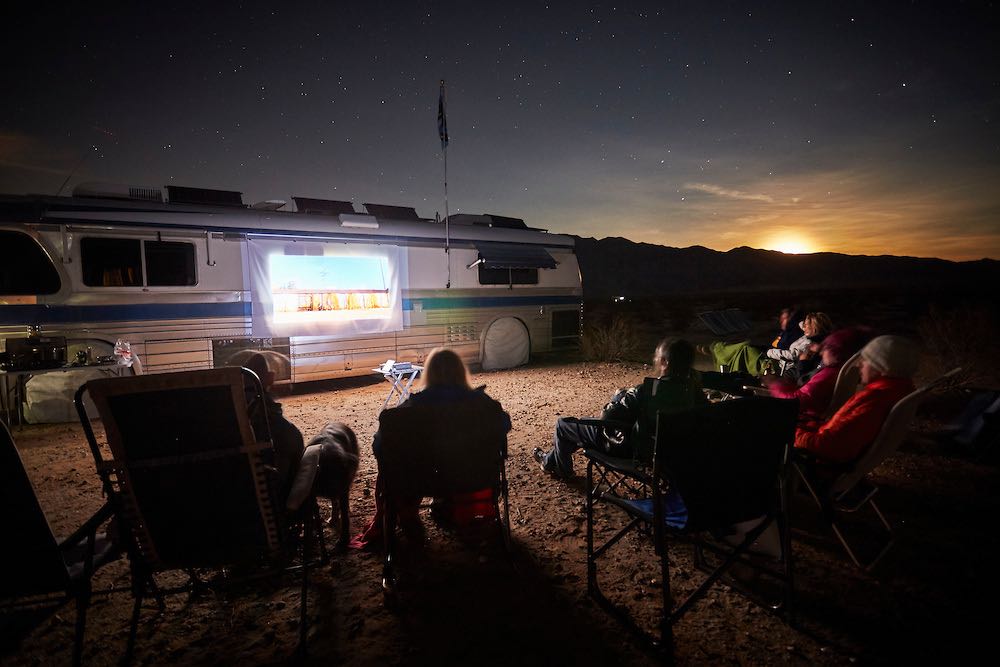
When it comes to movie night – bigger is better.
But a lot of the best cellular plan options for streaming video are “on device” only – blocking the content from easily being shared with your big screen in your RV living room.
Or if you’ve been able to snag some free WiFi along the way to watch a few show, then the content is only on your tablet or smartphone. Which you do have the option to use mirror methods to get it to your big screen (such as using an Apple TV with an Apple device to use Air Play).
The best way around this is to use your smartphone or tablet to drive the big screen directly via a hard-wired HDMI video cable.
With Apple iOS devices it is easy – Apple’s Lightning Digital AV Adapter works with all current iPhones and iPads and is directly supported by many apps to give you a dedicated video output over HDMI, all while enabling a separate view of the control panel on your phone or tablet.
In the Android world – HDMI compatibility is a bit more hit or miss. Look for MHL (Mobile High-Definition Link) support, which allows for affordable MicroUSB to HDMI interface cables to be used, and check for compatibility issues with your particular smartphone.
For most Samsung phones – the official Samsung HDMI adapter is a solid way to go. There are also very highly rated options that integrate the MHL adapter into a long HDMI cable, perfect for leaving your phone accessible while plugged into the TV.
Here’s a quick video going over this option:
A lot of RVers dedicate a tablet or smartphone to be the streaming heart of their entertainment center, permanently wired to their TV.
The overall experience may be nowhere nearly as nice as directly using an Apple TV or Roku, but at least you can watch all you want without running into limits placed on tethering data.
TIP: Though most streaming apps work with HDMI output, do keep in mind that some apps (like NFL Mobile) actively block all video output due to licensing restrictions.
More TV & Entertainment Tips & Tricks
You can learn more about this topic in our brand new guide. Including popular streaming services, optimizing streaming for mobile bandwidth, downloading content in advance, alternatives and international options.
(Some content is free to the public, and the more in-depth content is part of our premium member exclusives.)
Check it out:

This article is 4 years old, so I was wondering if there is an update to streaming Netflix in particular, using a MFI/Apple lightning adapter to HDMI? I’m looking at Amazon and all of these adapters say it won’t work with Netflix. I do have several options, that I’ve not tried yet, like a Roku, an Apple TV (albeit I believe airplay won’t work with Netflix now), etc. What’s the best method in Sept 2020 to get Netflix to HDMI via cell data on the iPhone? THANKS!!!
This is an older article.. the updated and much more updated one is now on our resource center at http://www.rvmobileinternet.com/tv
In my experience as of 2017 all the major streaming services have blocked mirroring over my iphone 7 in anyway including hdmi.
do you know of anyway left to do this.
Mac.
Most of them allow it.. only a select few don’t.
I’m hoping to hit the road in May. Finally got my business big enough that I can be a ft RVer. I’m looking forward to following you more closely especially as I’m having to be connected to technology. The smartphone to hdmi is something I wasn’t aware of but so happy for! Thank you! Kris
Oh, one more detail more directly related to video streaming if you’re contemplating international travel.
Netflix, thankfully seems happy to stream to us even though we’re outside the USA.
HBO: even though we have HBO Go membership, HBO will not stream to us (or presumably, anyone else) outside the USA. I hate pirated content but hey, HBO, time to get with the reality of the world in the 21st century.
Amazon: mixed story – some Amazon produced content seems available, some isn’t; there’s almost no non-Amazon video content available. This is true even after switching the relevant Amazon (Kindle) account to be based in the UK. I suspect bugs, but the story is confusing because their ToS still indicate the video streaming is US-only, when it clearly is not. Remarkable lack of obvious customer support to resolve this.
Video streaming outside the US gets tricky, as it depends upon the licensing agreements for each piece of content. Amazon and Netflix produced content is owned by the provider, so they have a lot more flexibility than content they license from others. We did a lot of testing of this last May when we were in Canada, and included our findings (and potential work arounds) in the guide linked to above.
A little perspective from the other side of the pond … we’re in Europe for 6 months in our Sprinter conversion, and the difference in the price of mobile internet just makes the US situation look … terrible.
We use two devices for mobile/cell internet: my wife’s Samsung Android phone and a Huawei mifi device. We pay Three (three.co.uk) 20 UKP per month for 12GB of data on the phone, and 25 UKP for 12GB of data on the Huawei which lasts for a year. Couple those prices with the current US$/UKP exchange rate, and mobile data looks entirely different here than it did in the US/Canada.
With rates like this, streaming video is entirely plausible and reasonably priced. We could pay even less if we got a contract or were willing to use a different provider.
Plus, here’s a little tip to be added to the RV Internet handbook: if you are buying a mifi-like device (cell service => wifi hotspot), and have the option of buying one that can handle the RF bands used for 4G/LTE outside North America, then do so because the difference is typically just a few dollars. Verizon in particular currently have two of their ACxxxx devices, one of which is N.America only and the other can handle both sets of RF bands – the price difference is less than $20. If you don’t do this, your mifi device will not be usable across continents, and you will have to pay double to have two different devices. Our Huawei (purchased in the UK) is not capable of handling N. American cell RF bands, so we’ve ended up with the two device solution. Now you can all do better!
In all fairness, each European country is more comparable in size to a US state, than the entire country that the US carriers have to cover. That said, we’re tracking several options for bandwidth in the US that are very affordable for streaming. Such as T-Mobile for as little as $35/month for unlimited video streaming. Or a Sprint unlimited option as low as $10/month. Or AT&T unlimited as low as $65. Or Verizon unlimited data plans (with pretty awesome nationwide coverage) starting at $45/month.
And yes, we do cover selecting devices with Global support in the book and our guides on the resource center.
The specific thing I should have mentioned there but did not: most mobile/cell phones these days are “international” – they support multiple sets of the RF bands used in different places around the world. Just switch the SIM card and you can use your phone for connectivity no matter which continent you’re on.
You might expect this to be the default for “mifi” devices also, but at this point that seems not to be the case. There are a few that do, but many more that do not – they are restricted to the RF bands used in the areas where they are sold.
This is great info especially with Netflix now allowing us to DL movies, which we do with Wifi only, and then watch offline. No more huddling around an iPad mini screen!!
Chris & CheriÁ¨ well done video/article very informative
Thanx for all your great internet info. Even with a Verizon unlimited plan, I would want to not overdo it. Not after reading your article about plans using over ?? data being shut off. For example the video above, educational in nature, can be played at several different resolutions from 144 pixels to HD. Big difference in data. So unless it’s something super visual then I go to the gear and choose 144. I try to chose the lower quality, as at this point I do not have a large screen and then what would be large across the isle of an 8 ft wide RV, is still probably small enough to comfortably watch things in medium quality. Most the time there is a space and power issue to what size screen will be on board. Then the one time that it’s really important, I choose HQ. I wish more streaming sites had as wide a choice in size at YT, but more are starting to. One way to save data and or not jeopardize the precious unlimited. Somewhere I heard Netflix has a low and high setting, but I can’t be sure. As I remember I think it was still 3G for a movie.
Netflix actually has 4 quality settings for their playback, ranging from .3 to 7 GB of data per hour.
DirecTV NOW…..A full report! Currently I have Comcast /Xfinity Cable at my house. I’m always searching for a way to cut the cable and be able to bring the various news shows with me and reduce my costs for internet and content at home. Xfinity offers a free service called “TV GO” that is supposed to allow you to watch whatever channels you are subscribed to on your personal device. But you have a 50/50 chance that it will be working when you want to use it. It is FREE only if you subscribe to the cable service at home.
DirecTV just launched DirecTV NOW this past week. Currently they offer a 7 day free trial service. And a promotional offer of 100 channels for $35 a month.
I signed up to give it a try………So, to cut to the chase….in a word….FANTASTIC!
I used my Sprint HotSpot with only one bar of LTE, My Verizon MiFi with three bars, the Xfinity WiFi service (thousands of Xfinity WiFi hot Spots all over the country) and my TechnoRV ALFA 36 WiFi booster to my home WiFi router………..In all cases the performance was phenomenal! Takes a couple SECONDS to log on and begin seeing broadcasts. Picture quality is simply amazing for a streaming service.
I used AppleTV to “mirror” it from my Ipad mini to a 55″ TV and video quality remained full HD.
To say I’m impressed would be an understatement!
But more importantly, I’m paying $69 a month for about 40 basic channels on my Comcast/Xfinity cable system. I would have cut the cable long ago, but we like Fox News, CNN and MSNBC and these were not available streaming reliably until now.
Now for the bad news. Using the “data used” screen on my Sprint MiFi unit, I used 86mB for 5 minutes of streaming…….That is about 1G an hour if my math is correct……..You need an unlimited service or lots of Gigs if you are going to use this service remotely for any length of time. I’m not sure if AT&T, who how owns DTV, has a deal for this service? More research is needed.
Anyways…The future is now! Extreme high quality streaming with lots of selection for a reasonable price.
We actually covered DirecTV over on the resource center, including how it works withAT&T plans: https://www.rvmobileinternet.com/att-announces-directv-now/
I am lucky and have a true unlimited data plan with Verizon. A word of caution about carriers. While you might like some features of one or another provider, from my experience all over the country, where you camp you will probably not have signal if you do not have Verizon. The sole exception that I know about is Flamingo in the Everglades National Park where ATT works but Verizon does not.
A point we try to make very clear in our mobile internet content, and covered in our guide to the carriers: http://www.rvmobileinternet.com/four-carriers
Not so true – we’ve driven from one coast to the other and many parts all over the west Nat’l parks, and many spots in between and yes in a few places we did not have AT&T but more often than not, we did, even out in the wilderness. AT&T has gotten much better over the last two years. We really have not had much troubles getting a signal from AT&T.
PS – Flamingo Campground is fantastic. Those cold showers in the afternoons felt so good in the humidity/warm climate. We were there in April and about the only ones there. That’s where we got the Nat’l Park senior pass and RV camping (water/elec HU with a dump station) was just $15 a night. We had a fantastic stay!