• Skip to primary navigation
  • Skip to main content
  • Skip to primary sidebar
  • Skip to footer
Technomadia

Technomadia

Adventures in Nomadic Serendipity

  • Blog
  • Video
  • Technology
    • Mobile Technology
    • Solar Electrical System
    • Lithium Ion Batteries
    • Mobile Internet Setup
    • Mobile Internet Resource Center (Our Work)
  • Nomad
    • No Excuses: Go Nomadic Series
    • Nomadic Lifestyle Featured Posts
    • Travel Maps, Annual Wraps-Ups & Plans
    • Fitness on the Road/Water
    • Cost Log
    • Kiki’s Corner (RIP: 2008 – 2024)
  • RVing
    • Zephyr – 1961 Bus Conversion
    • Blooper – 2020.5 Winnebago Travato 59GL Van Conversion
    • Bus Projects
    • RVing Lifestyle Featured Posts
    • RVing Travelogues
  • Boating
    • Y-Not — 1999 Bayliner 4788 Motor Yacht
    • Boat Projects
    • Cruising Lifestyle Featured Posts
    • Cruising Travelogues
    • Great Loop Map & Posts
    • St. Johns River Cruising
  • About Us
    • Start Here – Quick Intro
    • Our Full Story
    • “Technomedia” (Media Appearances)
    • Say Thanks
    • Contact Us

Postcards from the Road

Life on the Road Lifestyle Nomadic Lifestyle RVing Tech Reviews

May 16, 2014 by Chris Dunphy 10 Comments

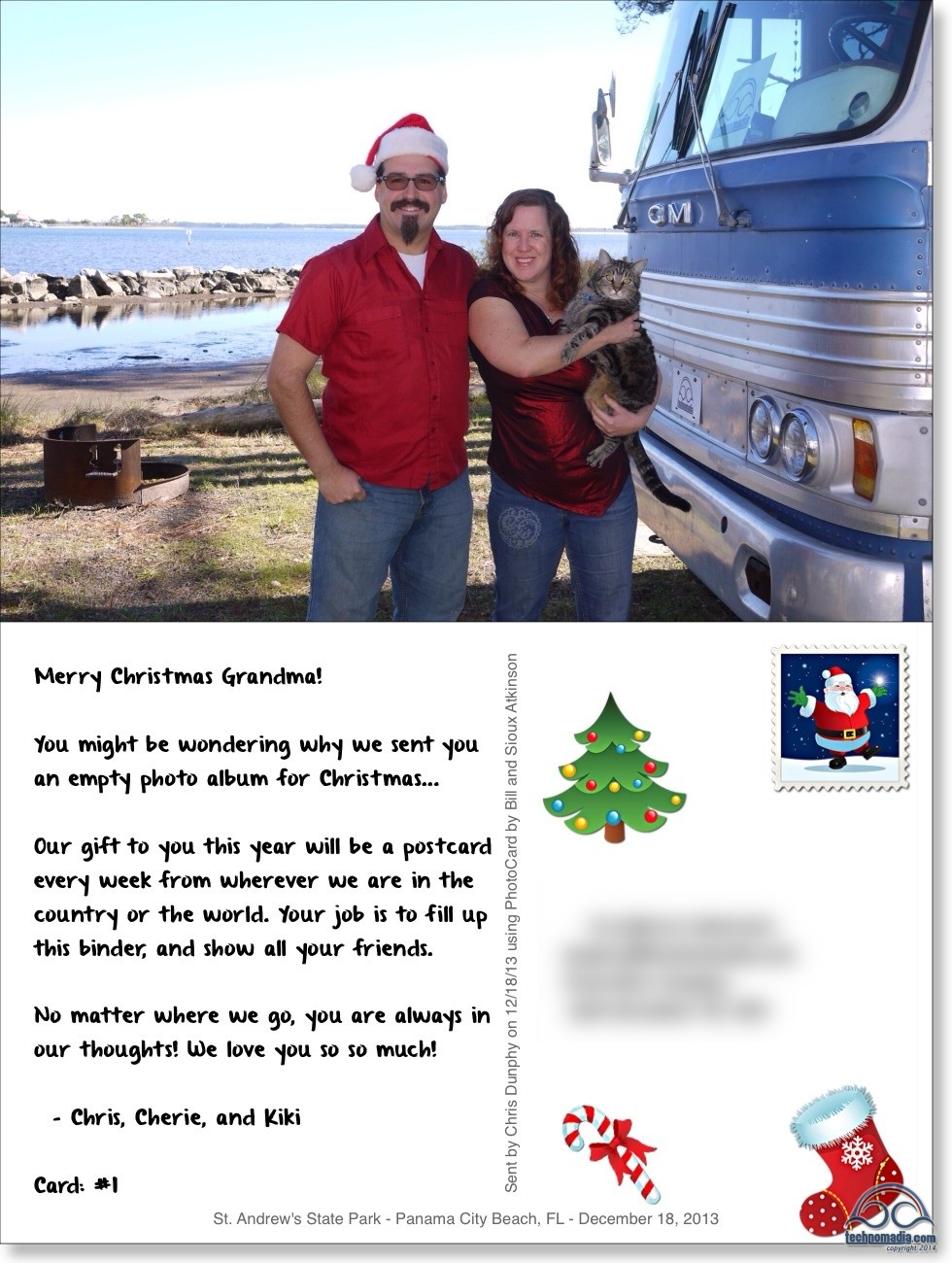
All she got for Christmas was an empty book and this one postcard...
All she got for Christmas was an empty book and this one postcard…

Last year, for Christmas, I gave my 91 year old grandma an empty book.

And no, I was not being a grinch.

Technology makes it easy to stay in touch with connected family and friends. I regularly FaceTime with my folks, exchange text messages with old friends, and our blog and Facebook make it easy for most everyone we love to keep up with us.

But…

What about those important people who just aren’t online?

My grandma is amazing in almost every possible way. Up until a few months ago, she still participated in a bowling league, mall walking, and working out at Curves nearly every day.

Her motto: “If you don’t use it, you’ll lose it.”
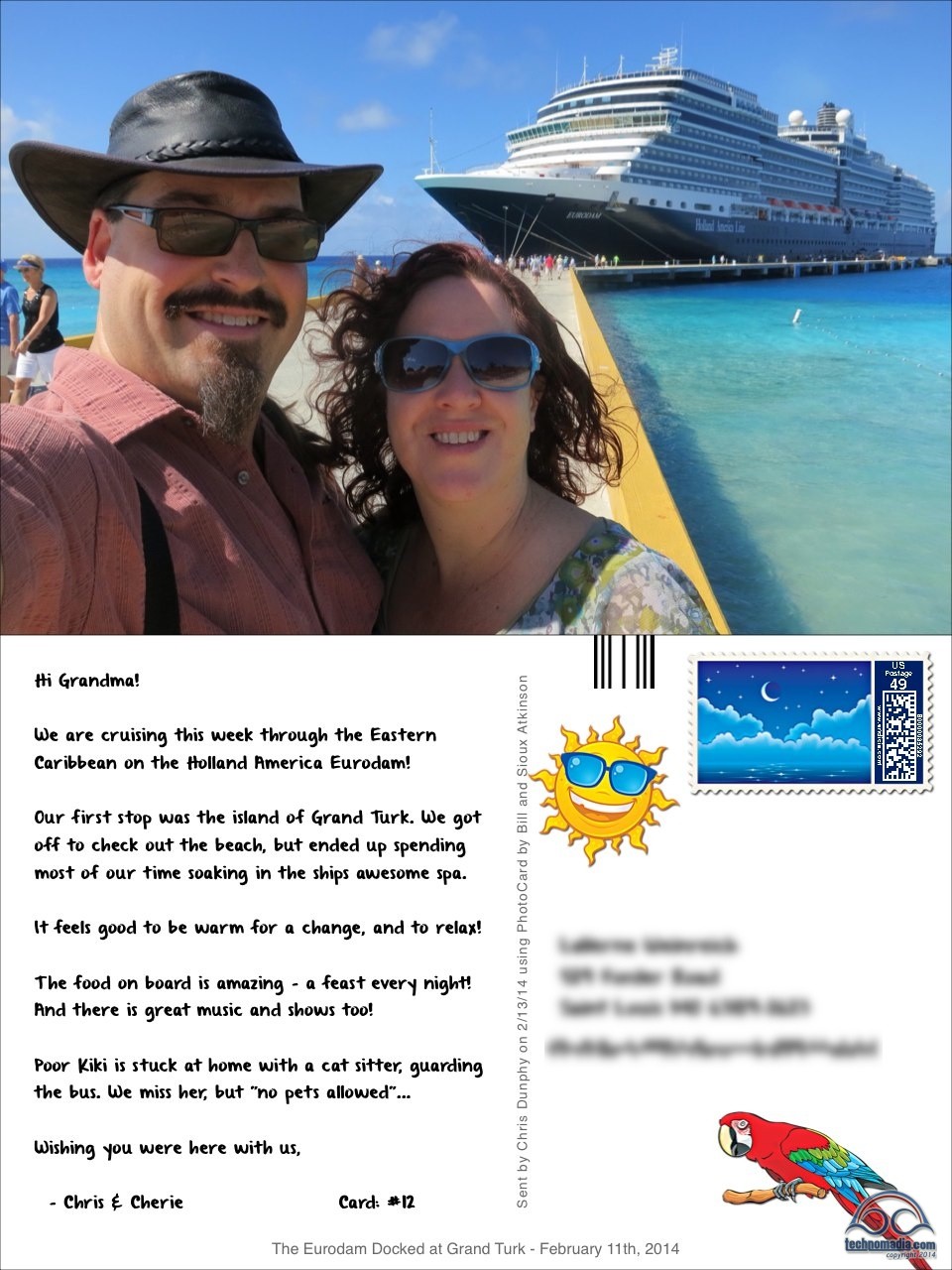
We sent postcards from our cruise - before we even made it back!
We sent postcards from our cruise – before we even made it back!

But when it comes to computers, well… At 90 she was mowing her own lawn and cleaning her own gutters – I guess I can’t expect her to be surfing the web too.

I’ve always struggled with how I could share my life and adventures with her, other than via occasional brief phone calls and having stories pass through my mom. If only there were a way to get snapshots of our life into her hands…

Perhaps there’s an app for that?

Last year I discovered the amazing free iPhone / iPad app PhotoCard by Bill Atkinson – and in it I found the perfect way to be able to share customized photo postcards with my grandma!

PhotoCard allows you to take any photo, and to turn it into a postcard with custom text, “stickers”, and even a custom stamp. You can then send these postcards via email for free, or for a small fee the company will print the card and send it via postal mail to anywhere in the world. Perfect for us on the road who don’t find our way to post offices very often!

Printed cards cost around $1.70 each for US destinations, or just $2.50 to mail internationally.

So that brings us back to the empty book…

Even Kiki sends Grandmeow postcards!
Even Kiki sends Great-Grandmeow postcards!

For Christmas, I sent my grandma an empty photo-album filled with 60 blank pages. And I made her a promise to send her a postcard every week to share with her and chronicle our year.

This has been a fabulous ongoing project – I have loved having a way to share with my grandma every single week. Especially when she fell and was going through some rough times earlier this year, focusing on creating cards for her really helped me to feel close.

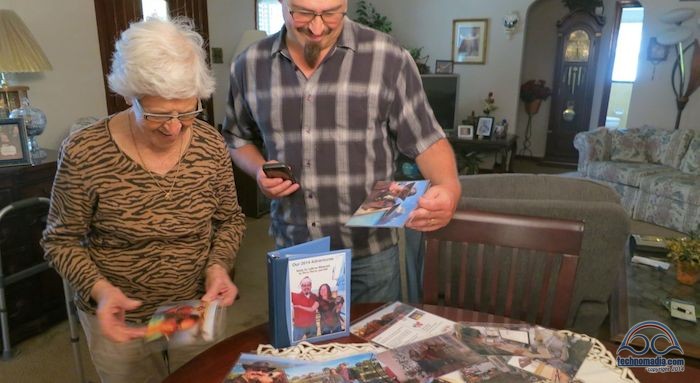
And when we passed through St. Louis recently, it was awesome to get to sit with her and go through the book together.

If you have anyone in your life who isn’t online – I can not recommend PhotoCard enough. There are other good postcard generating apps out there, and I tried many of them, but this one sets the standard for elegance and simplicity that really blows me away.

TIP: If you want to recreate this project for someone you love, keep in mind that the cards PhotoCard sends are over-sized 8.25″ x 5.5″, not regular postcard size. We had to seek out an appropriately sized blank album for the cards. We found ours on the binder isle of an office supply store, along with packages of the 8.25″ x 5.5″ clear inserts. I also suggest numbering the postcards to make it easier to keep in order, or to discover if any end up lost in transit. So far 1 out of 25 has gone missing, but when I discovered this it was easy to resend.

Help keep the USPS in business and send a PhotoCard to someone you love today!  *grin*
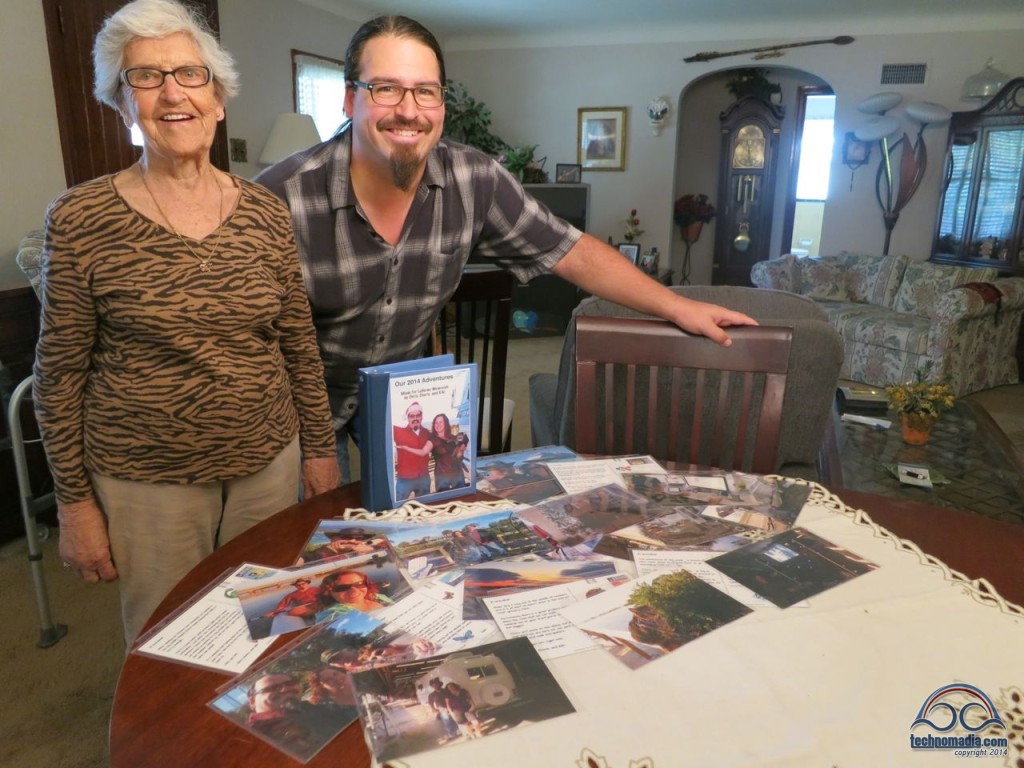
Grandma-and-Postcards
Shhh.. don’t tell Grandma.. this will be her next photo card!

Sharing is Caring:

  • Click to email a link to a friend (Opens in new window) Email
  • Click to share on Facebook (Opens in new window) Facebook
  • Click to share on X (Opens in new window) X
  • Click to share on Pinterest (Opens in new window) Pinterest

Like this:

Like Loading...

Related

Life on the Road Lifestyle Nomadic Lifestyle RVing Tech Reviews

Reader Interactions

Comments

  1. Janet Shingleton says

    Nov 21, 2016 at 7:39 pm

    Love the postcard idea! My mom doesn’t “do” technology either, & loves getting mail. I just downloaded the app and created and snail mailed her 1st card. Thanks for the tip and link!
    I’m a newbie RV’er on my maiden voyage in my ’17 Trend 23L and enjoy your blog & emails.

    Reply
  2. Diane Ziemski says

    Jul 5, 2015 at 7:39 pm

    Super, but dont forget the youngers…. I send a postcard from every place we go to my grandkids…. The oldest is 6… They have a printed map and their parents help them mark on the map where we are…. Havent done the book, but I will now… Thank you…

    Reply
  3. Kelly says

    Dec 19, 2014 at 1:03 pm

    Ahhh you made me teary and I’m not a crier! Love this post!!

    Reply
  4. Fergie says

    Jun 14, 2014 at 9:38 am

    Thanks for sharing. What a great idea. My mom is 92 and this would be perfect for staying in touch as we start our full-time adventure next month.

    Reply
  5. LindaW728 says

    May 17, 2014 at 12:03 pm

    What a fantastic idea! I know my older relatives absolutely LOVE getting pictures and letters in the mail. Is it hard to remember to do it every week? Thanks for the tip on the app! I’m going to check it out.

    Reply
  6. Loretta says

    May 16, 2014 at 6:29 pm

    Do they make an app for an Android?

    Reply
    • Chris Dunphy says

      May 16, 2014 at 8:30 pm

      PhotoCard is iOS only – but I am sure there are plenty of other postcard options, even on Android.

      There were plenty of others on iOS too, but this was my favorite by far after trying several.

      Reply
  7. Kerensa says

    May 16, 2014 at 1:30 pm

    Thanks for sharing. I have used postagram for my grandmother and even mother and mother-in-law who just don’t get online often enough to look at photos. Postagram is nice because the square photo can be popped out and saved, but I like the large format of these. I’ll have to give it a try.

    Reply
  8. Chris Dunphy says

    May 16, 2014 at 1:18 pm

    Tiny bit of bonus geek trivia…

    The creator of PhotoCard, Bill Atkinson, also happens to be the legendary developer who was part of the original Macintosh team and designed much of the original Macintosh user interface. He also wrote MacPaint and HyperCard – two of the most innovative programs of their day.

    His personal impact on the modern computing world is immense.

    How cool that he is creating iOS apps now! *grin*

    Reply
    • Greg Miller says

      May 16, 2014 at 2:54 pm

      Bill Atkinson is a legend! To tie things together, I use a programming environment for iPhone and Android apps called LiveCode that traces its lineage straight back to HyperCard. Yep, it is that fun to work with.

      Reply

This blog is fueled by YOUR enthusiasm. Your comments help inspire the next post.. don't be shy!Cancel reply

Primary Sidebar

Welcome to Technomadia!

technomadia
Chris Dunphy & Cherie Ve Ard - Technomadia.

Perpetually on the road since 2006 combining technology and travel (tech+nomad). Semi-retired now, working remotely runnng the Mobile Internet Resource Center - helping our nomadic community stay connected.

We currently split our time between our motoryacht slowing doing the Great Loop, our vintage bus in the west and a camper van to move between them.

Mobile Internet – It’s Our Passion!

We track and education on mobile internet options for RVers and cruisers as our 'day job'.

Visit our extensive resource center at: Mobile Internet Resource Center

To see our personal mobile internet setup:
Technomadia's Internet Setup

Our Newest Posts

Annapolis, Baltimore and More – Wrapping Up our 2025 Chesapeake Bay Cruising Adventures!

Nov 13, 2025 By Cherie Ve Ard 2 Comments

Eastern Bay & Chester River – Upper Chesapeake Bay Great Loop Cruising

Oct 25, 2025 By Cherie Ve Ard 1 Comment

Choptank River Adventures – Upper Eastern Chesapeake Bay: Great Loop Cruising

Oct 8, 2025 By Cherie Ve Ard 4 Comments

Anchoring vs Marinas: Which is Better?

Sep 19, 2025 By Cherie Ve Ard 2 Comments

Returning Down the Potomac River and Back to the Chesapeake Bay – Great Loop Side Trip

Sep 5, 2025 By Cherie Ve Ard 3 Comments

Our Resource Centers

  • RVing Resources

    Our informational RVing content.

  • Boating Resources

    Our informational cruising content. 

  • No Excuses: Go Nomadic

    Logistics of a nomadic life: domicile, finances, safety and more. 

  • Mobile Internet Recource Center

    Guides, Reviews & News about Mobile Internet Options for RVers & Boaters (our 'day job')

  • Interviews

    Our 'Ramblings' Series - tales with other nomads. 

  • Solar

    Solar Electrical Systems for RVs

  • Boondocking

    Getting Off Grid and into Wild Camping

  • RV Workspaces

    Full Time RVing Workspaces

Our Travel Apps

We write mobile apps inspired by our own nomadic lifestyle.


Coverage?Coverage? directly overlays and compares cellular carrier data maps. Perfect for bandwidth hungry travelers!
Download_on_the_App_Store_Badge_US-UK_135x40 Get it on Google Play

US Public LandsUS Public Lands overlays BLM, Forest Service, NPS and public land boundary maps. Helping you utilize US national resources!
Download_on_the_App_Store_Badge_US-UK_135x40 Get it on Google Play

StatelinesState Lines tracks over 50 laws that change as you cross US state lines - beer, txt, seat belts, smoking, RVing, etc.
Download_on_the_App_Store_Badge_US-UK_135x40 Get it on Google Play

Footer

Fleet Status & Travel ‘Plans’

Boat: In storage - Maryland
Bus: In storage - Arizona
Van: In motion - MD to FL to AZ

Current Travel Segment:

Back to van life - first Florida, then Arizona for winter! Technomadia

Are we coming your way?

Be In Touch!
View our full Travel Map

Join Us – Be In Touch

Contact Us

YouTube

Facebook

BlueSky

RSS Feed

Subscribe to our Posts 

Archives

About This Website

This is our virtual living room - sharing here is our hobby, not our primary income source. Yup, we do this all for fun. We are self-funded and accept no sponsorships, advertising or guest posts.

Some links however may be affiliate links - they provide a little extra ka-ching to keep us motivated. Some items we may have received at no cost (always disclosed).

Our motivation is to share a slice of our mobile lifestyle and make new friends. Technomadia.com is provided for entertainment purposes only.

This content is copyrighted

We love it when you share our content, but please ask before copying it. Thanks!

Privacy Policy
Terms of Service & Disclosure

  • Mobile Internet
  • Solar
  • Lithium
  • Boondocking
  • Workspaces
  • Interviews
  • Gear
  • No Excuses
  • Videos
 

Loading Comments...
 

    %d