
Just released! The newest chapter in our No Excuses: Go Nomadic’ series!<— Read Chapter 14: Feeling Safe While Traveling
We apologize that is has been several months since we’ve released an updated chapter to this No Excuses: Go Nomadic series … it has been a busy few months for us.
And we knew that updating this chapter was going to be a doozy, as we wanted to try to give a full overview of mobile internet options, instead of just 10 tips. It wasn’t until we sat down to start re-writing this chapter, that we fully realized just how much content we had in our brains on mobile internet.
For this article series, we’ve updated our top 10 tips for keeping connected while traveling.. and will leave the details to our new The Mobile Internet Handbook.
If you’ve previously purchased a copy of the eBook/PDF version of No Excuses: Go Nomadic, this chapter has been updated and now includes a special discount code for The Mobile Internet Handbook.
And now… our ten tips for keeping connected while roaming:
Tip #1: Soak up any WiFi you find!
Often the fastest, cheapest, and easiest way to get online is to use public WiFi networks, and in some parts of the country and world these are growing increasingly easy to find. Many libraries, coffee shops, RV parks, motels, and even fast food restaurants now offer free WiFi. Use it when you find it!!!
Tip #2: Embrace multiple pipes!
The more possible on ramps to the Internet at your disposal, the more likely you are to find one that works. Embracing diversity of connection types and networks is the best possible way that you can maximize your chances of getting at least somewhat of a workable connection, particularly since WiFi alone is rarely going to be enough.
 Tip #3: Understand roaming & coverage issues!
One place where all the carriers are a bit deceptive is around ”roaming”. Because they want their networks to seem as large as possible, they go out of their way to hide from you that you may be roaming and running into usage limits hidden deep in the fine print of their contracts. Stay on guard!
Tip #4: Beware near borders!
Beware of international borders! All carriers charge an arm and a leg for international roaming (including onto the onboard cell networks offered on cruises now). If you are going to be anywhere close to an international border, make sure to turn off data roaming on all of your devices. Otherwise, you might find that you accidentally stumbled into a multi-thousand dollar bill.
Tip #5: Know your caps!
Most fixed location Internet connections are unmetered, but mobile data is very commonly capped, and often comes with overage charges for ”excessive” use. Save your big downloads for the days when you are visiting friends with a fast cable modem connection, or a coffee shop with both ample caffeine and bandwidth to satisfy your cravings.
Tip #6: Avoid contract lock-in!
Though you can often get your hardware cheap or free if you sign a two year contract, these contracts come at a price of severely limiting your technomadic flexibility to change carriers or even countries on a whim.
It is often better to buy used equipment, and avoid the lock-in if you can. If your situation ever changes, you can usually resell used equipment for the same price that you bought it for.
Tip #7: Learn parallelizing & batching!
Things like email and syncing RSS readers work wonderfully in the background, and you often can’t even tell that you are on a slow or high-latency connection. But web surfing can feel painfully slow if every new page takes minutes to render.
To deal with this, parallelize your browsing using multiple tabs. Whenever you see a link you want to follow, select ”Open Link in New Tab” and make sure your browser is configured to load tabs in the background. You can queue up dozens of pages this way, and by the time you flip over to reading them they will have fully loaded in the background.
Once you get used to surfing this way, you’ll never go back to using just a single window without any tabs — even on a fast connection.
Tip #8: Boost what you have!
While a signal booster and/or an extensible antenna mast can work wonders to help you get online from afar.
These systems aren’t magical, but on several occasions made the difference between having a barely detectable signal and a barely usable one.
Tip #9: Satellite tips — tripods and trees…
When selecting a mobile satellite setup, you can go with an expensive roof mounted robotically aimed dish that can lock on to a signal with the push of a button, or you can go with a tripod mounted system that has to be manually set up and aimed — an admittedly very cumbersome process.
Tripods have one key advantage though — you can better position them to find a gap in the trees to hit the satellite. Even the smallest branch in the way can obscure the signal, so this flexibility can come in handy while still allowing you to park in the cooler shade.
Tip #10: Final Tip — We Repeat — Manage Your Expectations!
If you are planning in advance on having good net days and bad net days (and even no net days), you can better manage your own expectations around what you will be able to get done online, and when. Managing your expectations is perhaps the ultimate key to avoiding frustration!
Sure mobile connectivity can be a major hassle sometimes. But when your view is changing every day, you are able to Skype from the middle of the Black Rock Desert, and handle a contract from the top of a mountain in a national park, the hassles are so absolutely worth it.
<— Read Chapter 14: Feeling Safe While Traveling
Read Chapter 16: Coming Soon — Feeling Held Back —>
No Excuses: Go Nomadic
This article is part of an ongoing series answering the common excuses folks give us for why they’re not pursing their dreams of full time travel. We launched this series a few years ago as Answers to the Common Excuses – and are in the process of massively updating it. We’ll be releasing newly updated & expanded chapters over the coming months. We’ll be addressing topics like: Affording It, Family, Pets, Logistics, Healthcare, Community, Keeping Connected and more.
Read the whole series: No Excuses: Go Nomadic
eBook version – This blog series is also available as a convenient eBook. We offer this compilation on a pay as you wish’ basis. We don’t aim to make a living off our blog, but contributions to keep the blog going is appreciated (kinda like taking us out for a thank-you beer or dinner).
Cost: Pay As You Wish (really… just set the price!)
PDF Format

(If you’ve purchased before, and would like a complimentary updated version, be sure to use the special discount code found on Page 6 of your current copy.)
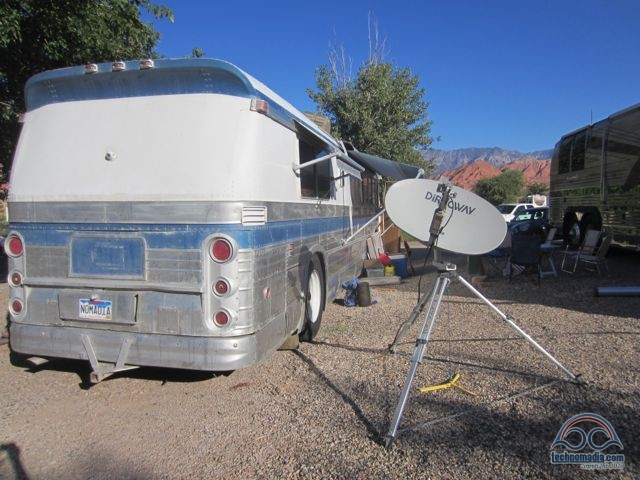
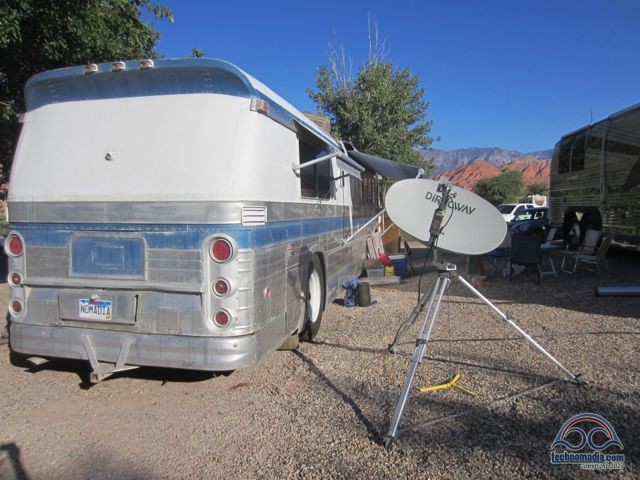
What kind of devices do you need to aim the dish pictured here? Also, is the tripod and dish mount a custom one?
We just used an iPhone app, a compass and a level. (Today, all those are built into the iPhone, so wouldn’t even need those). And yes, the mount was made by a company that formerly specialized in such things, they are now out of business.
The international border tip is right on. We had this happen while golfing in Arizona near the Mexican border. However, we did not pay the bill. After a long pleasant conversation the charge was removed.
Barbara
I still stick to Wi-fi only, the cheapest option 🙂 Even if I never eat there Mc Donald’s it’s a great place for free internet…and toilet! 🙂
For your style of travel – backpacking through lots of countries – free WiFi hotspots definitely makes a lot of sense.
Okay, so I just learned today that, according to Verizon Wireless, they round up bandwidth usage.
What does that mean, ‘they round up’? Why are they rounding at all?
I think what he is referring to is that Verizon (and every other mobile carrier) do not pro-rate usage, and they round up to the nearest gigabyte. So if you use 5.1GB in a month, they charge you for 6GB.
This makes it hard to squeak in and use 4.9GB – it is too easy to accidentally go over.