
One of our most frequently asked questions (right up there with “How old is that bus?” and “Oh, wow, is that a cat on a leash!?!”) is “Who has the best cell network?”
As technomads who have been living and running our business on the road for 5+ years now, indeed, we have more first hand knowledge about staying connected than most, and have written some internet connectivity posts offering up advice.
We can tell you all about the pluses and minuses of every network in the USA, usually because we’ve tried them all out.
But as for the best one overall? In short, there is no simple answer.
If you live in one location and only travel occasionally, it’s relatively easy to pick a network. Obviously, you go with the one that you’ve observed to have the best service within your area, knowing that coverage and speeds may actually vary block-by-block in your neighborhood due to tower placement and network load.
While there might be an obvious “best” network for a given neighborhood, us frequent travelers have a harder choice to make. There simply is no single best network everywhere nationwide. All of the big four have their strengths and weaknesses in various locations across the country.
And they are all at different stages of evolution in their technology roll out. Verizon and AT&T are the first to bring the latest LTE technology to market, but while Sprint and T-Mobile lag behind, they are headed that way as well.
With the new iPad coming out later this week on Verizon and AT&T’s LTE networks – the “best network” question is once again buzzing all over. If you are going to stand in line on Friday to get a new iPad you’ll be faced with a choice: AT&T or Verizon. Or neither – and go with a WiFi version and use your existing internet pipelines.
Which should you choose?
Does LTE even matter where you plan to travel?
What on earth is LTE, anyway?
LTE
Long Term Evolution (LTE) is the latest and greatest cellular wireless technology standard that promises a future filled with blazing fast mobile internet speeds – so fast that even watching streamed HD video on the go is possible.
But with great speed comes great responsibility.
Using LTE it is theoretically feasible to actually use up an entire month’s 5GB data allotment in a matter of minutes, so you need to watch your usage carefully! HD video may be possible, but for now at least, it is not advised.
Both Verizon and AT&T have been aggressively rolling out LTE equipment and service, and Sprint has announced they will be abandoning their current WiMax 4G network to embrace an LTE future too. Even T-Mobile will be migrating towards LTE in the coming years, at last unifying all the major carriers under a common technological standard.
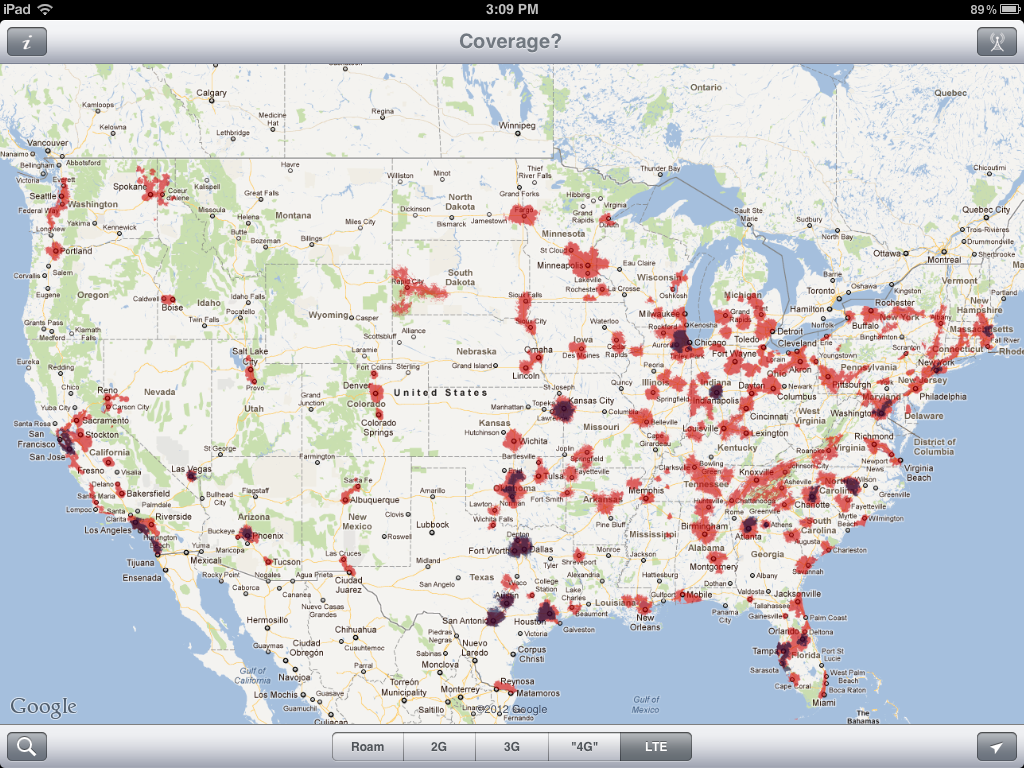
Above is Verizon’s (Red) vs AT&T’s (Blue) current LTE network, compared head to head using the newest release of our app ‘Coverage?‘.
If LTE is your goal, as you can see, Verizon is far ahead in rolling out coverage into many more markets than AT&T currently serves.
But LTE isn’t everything…
“4G”
While LTE has always been considered a 4G technology, lately the term “4G” has largely devolved into a marketing term to mean “anything faster than what we used to call 3G”.
What Verizon labels as “4G” is LTE, and the speed difference over Verizon’s older slow CDMA 3G network is night and day.
AT&T and T-Mobile though both evolved their 3G networks to support an intermediary technology called HSPA+, which though it is based upon third generation wireless technology, it is actually capable of speeds that in the real world are vastly superior to the older “3G” networks.
Some carriers called their HSPA+ networks 3G+, but AT&T and T-Mobile decided that the user visible difference was enough to start marketing their HSPA+ networks as “4G”. With this bit of redefinitional wizardry accomplished, suddenly AT&T’s 4G network jumped from being way behind Verizon’s to being somewhat ahead.
AT&T even finally convinced Apple to display HSPA+ coverage as “4G” on the indicator status of the HSPA+ capable iPhone 4S (if you’ve noticed this recently when you upgrade to iOS 5.1, that’s why – you’ve actually been getting this coverage all along.)
The new iPad though is capable of both HSPA+ and LTE, but AT&T makes it a bit hard to tell what coverage they have where.
It’s only through deep digging that you can determine what parts of AT&T’s network are using the faster LTE standard. In our ‘Coverage?‘ app, we’ve done the work of making that difference easily visible.
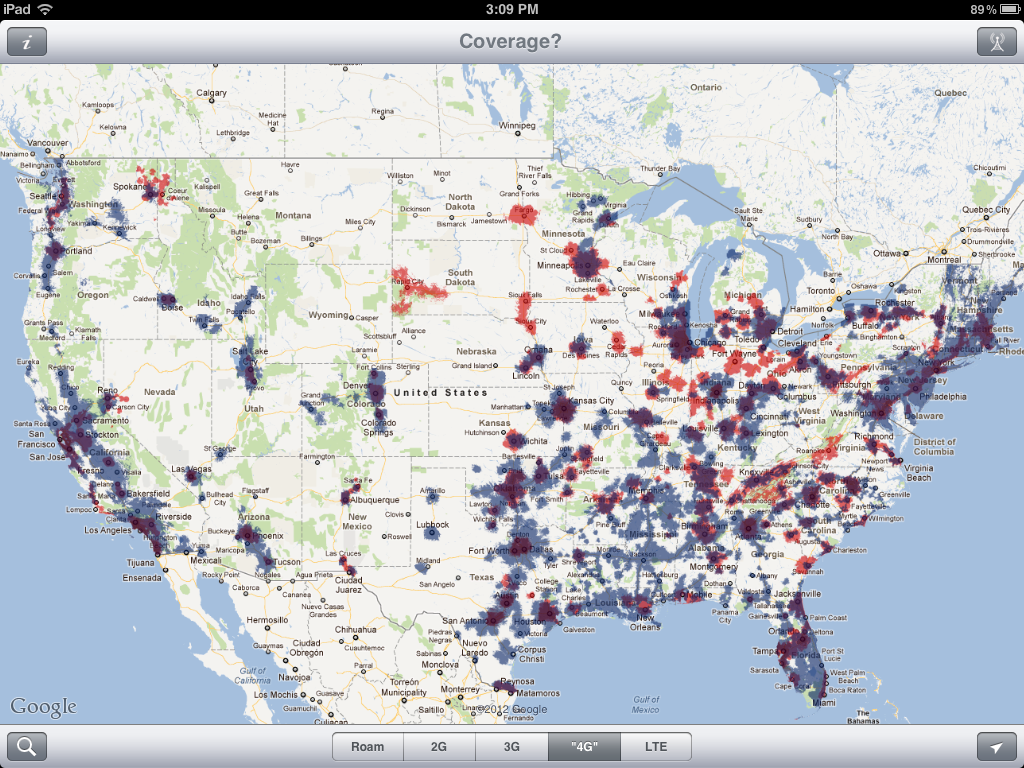
When you compare Verizon’s 4G network (which is all LTE) against AT&T’s 4G network (both HSPA+ and LTE) – it’s a much tougher comparison, with AT&T pulling ahead in many areas.
For 4G compatible devices, going with AT&T will actually give you faster speeds in many different places, particularly since Verizon’s 3G network is relatively slow and there is no intermediary step before LTE.
So this brings the question back to being dependent on where you plan to go and what speeds you desire as you travel. There is no easy answer.
Our Connectivity
Which network did we pick? We couldn’t!
We actually carry a Verizon 3G USB data card (contract-free via Millenicom – which unfortunately, they stopped offering this week due to running out of modems ) as our primary dedicated data stream.
We use AT&T for both of our iPhones, including one set up to create a mobile WiFi hot spot when needed.
We also have an iPad 2 on AT&T with a grandfathered unlimited data plan (perfect for streaming video content), and we just ordered a new LTE iPad on Verizon.
We like the redundancy that the combined coverage map of both carriers gives us. We used to have Sprint on board as well (who’s wider availability of unlimited data plans makes them tempting), and before that T-Mobile too.
For a technomad, there may be no such thing as too much connectivity.
The ‘Coverage?’ App
 All of the above images are taken from our iPhone/iPad app, ‘Coverage?‘
‘Coverage’ is a simple app we created to help us travelers determine where we’re most likely to catch some mobile bandwidth while on the go. Many of us travel with multiple networks on board, so this app allows us to create a personalized coverage map by overlaying our carriers and preferred data speeds – incredibly useful for planning routing, overnight stops, and campgrounds to put down the leveling gear.
However even if you aren’t always on the move, a lot of people have discovered that ‘Coverage?’ is the perfect tool for comparing coverage maps to decide which network to go with. As far as we know, ‘Coverage?’ is the only tool that actually lets you directly overlay and compare data speed separated coverage maps in this way. The maps are based upon what the carriers report (which are optimistic, at best), so you do have to take them with a grain of salt. But if you are looking for a way to make a high-level comparison across the entire nation, we know of no better tool.
You can get ‘Coverage?’ in the App Store here. (And sadly, no, there is no Android version… yet.)
Are you planning on getting a new LTE iPad? Which network have you decided to go with? Why?
A professor of mine frequently quipped, “It depends”. Applies to connectivity too, eh? We had a pretty good Verizon USB 3G modem and were lured to 4G. What a disaster! The Pantech 7260 USB modem has been purely awful and we unwisely sacrificed unlimited 3G data plan. Unusually impulsive for us.
We also have Verizon Mifi 4G, which always outperforms our 7260, both in signal acquisition and speed. Looking forward to dumping the 7260 for something else. After reading your post, maybe we’ll look at something for the “blue” areas.
Jim
I have the original iPad and have been debating on the iPad 2 or the new version. I travel extensively and did not get the 3G version the first go around – big mistake for me. After reading this article about coverage (thank you very much) I am more convinced to go with the iPad 2 and stay with AT&T which I have for the iPhone, as it looks like it will be awhile before the major carriers get any real 4G coverage going. I am not a gamer nor do I need fabulous graphics for what I do. The retina display is nice, but for the photos I need to view the difference between the two is not enough to make me “need” the new display. Also I saw reviews on battery usage from the using retina display going from 8 hours on the prior versions to 5 hours on the new iPad. It looks like the new iPad will need some time for app developers to catch up as well.
Been on AT&T for last three years – works well in most urban areas, but not in the fringe.
Have iPhone that I tether to wifi-only iPad via bluetooth for connectivity. Works well since I alway have phone with me anyway… Bluetooth seems to use less battery power on both devices then wifi connection.
Next time we upgrade iPhones are going to try Verizon. They seem to have tad bit better coverage in the fringe areas.
Derek
Great article on the difference between the different versions of AT&T and Verizon for the iPad3. Best I’ve read yet on this delimma with the new ipad. All I want to do is make the right’ decision for my particular situation and not have any regret or remorse after having done so.
Both have their pros and cons but in the final analysis, if I’m going to spend that kind of money on an ipad (my first one), I sure don’t want to be in a location and not be able to have internet service. So, I guess ”coverage” is the main concern for me and if you can believe what everyone says, Verizon definitely has more LTE coverage than AT&T. My only real concern however, is that if Verizon doesn’t have LTE in a certain location where I am and it goes to their 3G, I will be in the slow lane. At least with AT&T, I would be in a faster lane with their HSPA+ which you stated in your article as being faster and I’ve heard that from others as well.
Also, I do travel a couple of times a year overseas, and it’s my understanding that the Verizon version now has a ”slot” and it WILL accept a GSM sim card from whatever country you find yourself in. Some claim that the AT&T version is the only one for overseas BUT a couple of sales assistants in the Apple store assured me that the Verizon version has been designed to handle international travel as well. I want to get even more verifcation of that.
So, right now, I’m leaning toward Verizon. Will probably get it within the next week after doing a little more research.
Again, thanks for your excellent article and if anyone has any input or opinions for me, I would love to hear them.
Tks.
Wm.
Would love to see some speed again. My Grandfathered Sprint broadband account has become beyond lame as of late (even in areas where it use to be fine). I looked at Millenicom the other day but they seem to be mostly just a Sprint reseller now. The decent plan you guys have seems to be history.
Yes, as in the article – the Advanced Plan has been taken down from Millenicom due to a shortage of the 3G modems. We’ve been hearing from a number of folks that calling them directly, they have been able to still get the service by asking and/or bring their own u760 USB device. They are also, apparently, working on putting together their new Verizon offerings.
By the way, the 4G/3G 20GB plan they offer is on Verizon – but as we’ve reviewed before, we had issues with the Samsung hotspot device.
VERY timely post. We are (just now) eyeing the new iPAD and will be getting one as soon as we can, but we just couldn’t decide on which carrier!! Not sure which way we’ll swing yet, but this post is UBER-helpful!
Nina
Glad you found it useful, Nina – even if it doesn’t give you a clear answer!
Both Verizon and AT&T have aggressive plans to role out even more LTE in the coming year. It’ll be an interesting battle!
I understand why it’s a hard choice, but shouldn’t we draw a line somewhere for real 4G?
It seems like AT&T, with the collusion of Apple, is just diluting the standard for their own gains. I’ve heard tell that the startup screen on the AT&T ipad goes so far as to flash “Powered by 4G” every time you turn the thing on. Personally, this is dangerous territory I think. AT&T is obviously pushing the idea that HSPA+ now qualifies as 4G.
We agree.. thus why we’ve made this post showing the differences and showing non-LTE as “4G” in quotes. And thus why we’re presenting it as such within our Coverage? app.
The best we can do is educate and provide tools to help show the diving line, as much as the companies want to dilute that line.
However, that said – there is a definitely distinction between 3G and HPSA+. It is legitimately faster, and for most purposes – highly usable.
BTW – according to the original standard definition of “4G”, even LTE does not qualify.
The first true 4G variant of LTE is LTE-Advanced, which is probably at least five years out.
So even the LTE providers were already diluting the standard. It is a slippery slope.
But in the end – it is probably best to focus on the user experience. And in that regard, HSPA+ is a leap ahead of older 3G (particularly Verizon’s 3G), and LTE is a leap beyond even that.
PS: The iPad does not flash “Powered by 4G” at any point in time.
so why not use pdanet to extend your phone’s web to your computer for only the license fee of pdanet?
John –
We used to use pdanet eons ago, but it does not exist on iOS. And you don’t need Pdanet anyway – Verizon at least has confirmed that they are going to be offering mobile hot spot support with their iPad data plans for free.
What about international traveling? Are any of the US LTE standards compatible with networks in other countries? Will an iPad 3 be compatible with the GSM networks in Europe? Will the SIM card that is associated with my unlimited AT&T GSM 3G plan (grandfathered in from my iPad 1) work in an iPad 3? Thanks for all the research into this topic!
Hi Gray —
LTE is looking likely to become a global wireless standard, but the frequency bands used in each country are different enough to require physically different antennas. So the Verizon and AT&T models are actually slightly different from each other, and there is not a European LTE version yet. When there is, that will likely have a different antenna as well.
That said – every version of the new iPad supports international 3G roaming, and they are not locked so you can use any local SIM you want.
Rumor has it that the grandfathered unlimited iPad SIM’s should work, but I’d be surprised if they give you LTE speeds with the old plan too. If so – that would be so awesome!
– Chris
Will the SIM card that is associated with my unlimited AT&T GSM 3G plan (grandfathered in from my iPad 1) work in an iPad 3?
We’re actually awaiting confirmation of this ourselves before we give up our iPad 2 on AT&T with unlimited. I’ll take unlimited usable bandwidth over speed any day 🙂