
\
 We are beyond excited to present our newest iPhone/iPad app: Coverage?
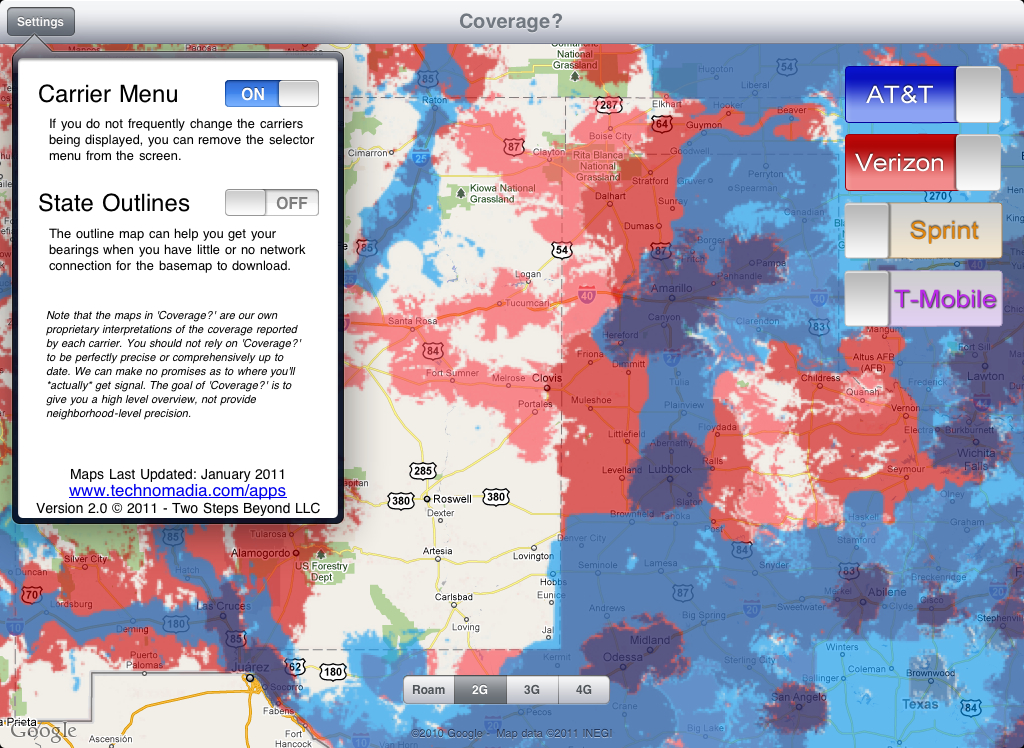
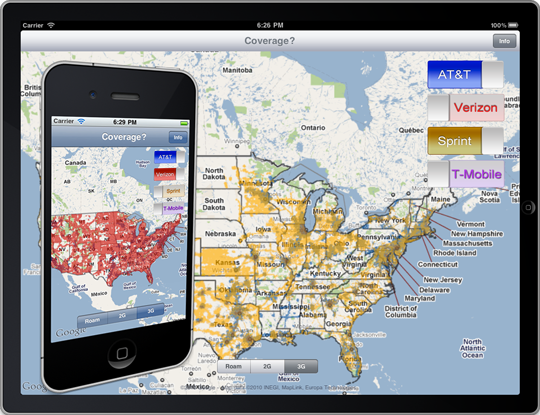
Coverage provides an at-a-glance “universal” coverage map by interactively overlaying the coverage maps from the four major nationwide US cellular providers.
We came up for the idea last summer when we set up camp in a beautiful field of wildflowers along the continental divide in Colorado with strong AT&T and Sprint signals. We planned to spend a few days catching up on work, until AT&T notified us that we had used up our 24MB “Off Network” allowance for the month, and Sprint emailed us to let us know that our Aircard had exceeded their 300MB Roaming cap. Yet neither our iPhone, iPad, or Sprint Aircard in our Macs gave us any indication we were “roaming” until after we were notified that we would be shut off until the end of the month.
If only there were an easy way to look up where we might be roaming, and where the nearest 3G might be, without needing to go online to do it….
And thus Coverage was born.
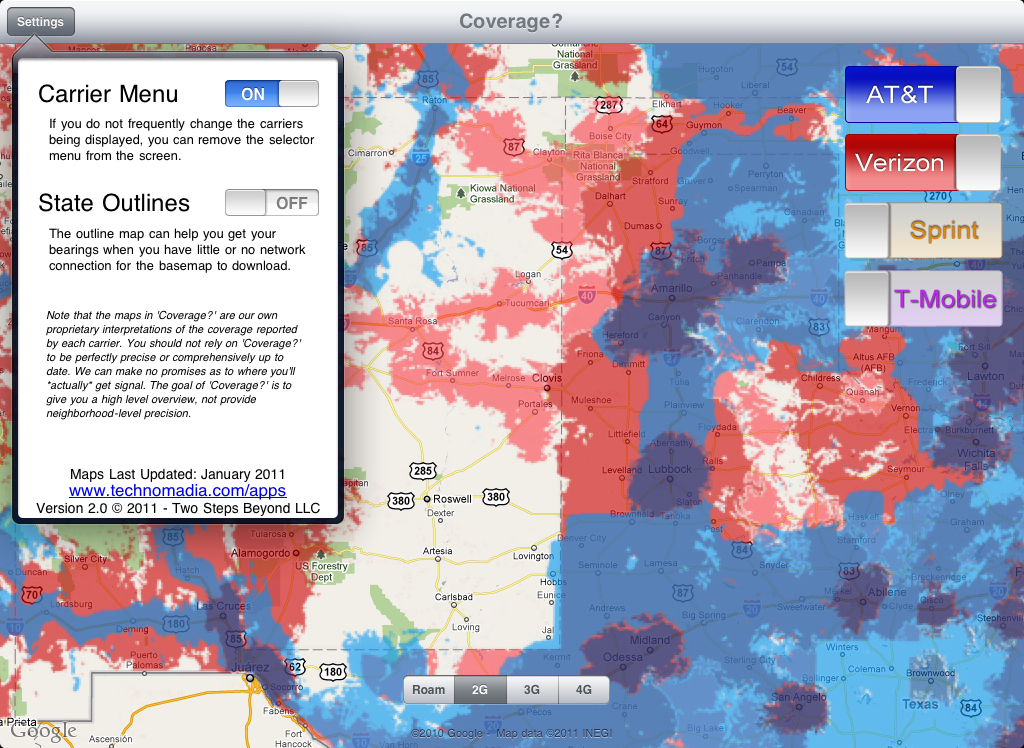
Checking each individual provider’s coverage maps can be done – but there had to be an easier way! When you don’t have a signal, it’s near impossible to determine where you might next get one.
Us bandwidth junkies just sometimes need to know when we’ll get our next hit.
We designed Coverage to be simple, easy, and genuinely useful. Here’s some of what makes it great:
- Easily know before you go: Avoid having to check each provider’s coverage map individually to know where you’re most likely to keep connected.
- No internet needed: All overlay maps are stored locally, so you can check where coverage is most likely to be found even when you have none.
- Urban and rural maps: The maps cover the entire continental USA for AT&T, Sprint, Verizon and T-Mobile.
- Know where to roam: View 4G, 3G, 2G and roaming areas as separate overlays, focus on the coverage type you need.
- Universal App: Compatible with iPhone, iPod Touch and IPad – iOS 4.2 and higher.
Here’s a quick video demo we made that tells the story behind the app, and gives some real world examples of how Coverage? can be useful:
Direct link to the video demo: http://www.youtube.com/watch?v=JNNzUtjgJIo
Bask in the joys of mobile bandwidth while avoiding the sorrows of roaming usage caps and absent signal.

Get it now, before you need it – just 1.99.
Use Coverage to determine which direction is best to head towards, which route is likely to keep you the most connected in your travels or determing if you’ll be likely to have signal on your next trip.

Winner – ‘Most Useful App’ – iOSDevCamp 2010
The groundwork for Coverage was built at iOSDevCamp 2010, and was named Most Useful App’ of the conference. We are absolutely thrilled and honored to have won this award for our idea, and are excited to be at last releasing the finished app to the world.
”If you’re a frequent traveler or you move around a lot, this app can be indispensable for leading you to the next well-covered area.” – Lifehacker, 1/13/11
”The function of this great little app is quite simple: it allows users to quickly and easily view coverage maps for each of the four major U.S. carriers” – Boy Genius Reports, 1/10/11
”Coverage? is a really useful app. It will be used on every trip I take.” – TUAW – 12/22/10
”Pretty simple, but also rather handy.” – Gizmodo, 1/11/11
Note that the maps in Coverage are our own interpretations of the coverage reported by each carrier. You should not rely on the maps in Coverage to be perfectly precise nor comprehsively up to date, though we intend to regularly update them.
We can of course make no promises as to where you’ll *actually* get signal. The goal of Coverage is to give you an indication of where you’re most likely to catch a wave, not provide neighborhood level precision.
So… Got Coverage?
+1 votes for Android version 🙂
Hi there – I just wanted to finally de-lurk to say that Coverage is an AWESOME app! The need for this was so huge, and you guys put together an amazing product. I’m sure I’ll be using it quite a bit going forward. 🙂
Thank you for de-lurking, Christy 🙂 We love hearing feedback like this, thank you!
If you’re so inclined, would you mind leaving a review in iTunes for the app? It would really help us keep the momentum going to make Coverage? a successful app so we can keep it updated. Thanks a bunch, and happy holidays!
Thank you so much for de-lurking, Christy 🙂 We love feedback like this.
If you’re so inclined, leaving a review in iTunes will do wonders to help us keep the momentum going. Thanks!
Great job guys, it looks fantastic!
Thank you 🙂
This is fantastic! Just the app I need! Great work, guys. 🙂
Thanks 🙂 We enjoy creating just the apps we need too… makes it so much more fun!
Grrr. Bought the app this morning and now cannot download it to my iPad because iTunes says I need the most recent OS 4.2 first (which I don’t want as I don’t want to lose my orientation lock switch). So, guess you can keep my 99 cents for now as I really don’t want to give up my lock switch or jailbreak my iPad.
BTW – the Map Overlay features at the heart of Coverage were actually not even supported in iOS 3.x. iOS 4.2 is the first OS for the iPad that Coverage was even possible on.
I’m sorry you didn’t notice the required OS listing – we’ll make it more prominent in the app description.
Thanks guys– I just updated my iPhone from 4.0 to 4.2 and now have it downloaded there. Great app! Just added my 5-star review to the App Store!
Looks like Apple caused the problems here more than anything– I do all my app downloading right from my i-devices, and Apple doesn’t display the requirements section there (so adding a quick note to your app description should help make up for that). FYI– It was a really weird install on the iPad 3.2.2. When I went to buy the app, it didn’t give me any pop-up warning that 4.2 was required and let me go ahead and buy it and start downloading it. The download then stopped halfway thru and said I needed to finish installing it from iTunes. When I tried again from there, iTunes finally gave me a message that 4.2 was required. (In contrast, when I later tried to “buy” it from the AppStore on my iPhone 4.0, Apple gave me an immediate warning that I needed to upgrade my phone first before I could buy it). Oh dear Apple– love ’em and hate ’em!
But thanks again for this app. I’m headed out to the SW in a week and it will be a godsend I’m sure! Happy Island Holidays to you both!
Yes, we were disappointed too that we had to make it 4.2 only. Apple unfortunately had a bug in 4.1 with their mapkit overlays that we could not get around.
You go right ahead and market your products here. It’s how us mobile people learn about another important part of our lifestyle.
Thanks, Linda 🙂 Much appreciate that, and all your help in spreading the word too!