
Most people know that international roaming charges can be pricey. But few realize just how outrageous these roaming charges can be.
But imagine how you would feel if you inadvertently racked up over $10,000 in charges after just an hour or two of web surfing and email while in a foreign country?
It happens, even to tech industry professionals who should know better.
Waiting for a flight in Toronto recently, Nilofer Merchant of Rubicon Consulting used her AT&T data card to catch up online rather than pay the $10 charge to use the airport’s WiFi.
Her phone bill for that usage? $10,609.27.
Our good friend Michael Mace works with Nilofer at Rubicon, and he has written in depth about Nilofer’s misfortune and how the mobile carriers routinely rip off customers who are roaming. If you travel and use mobile data, read this before it is too late!
Michael has to dig deep to find the fine print that discloses these outrageous fees, and he concludes that this warning printed in big red letters on the top of every phone bill would be a bit more appropriate:
“Using wireless data outside your home country is about as smart as juggling chainsaws. In a single day, you can build up charges large enough to buy us a new car. We’re constantly amazed that people keep falling for the roaming thing, but you know what PT Barnum supposedly said about suckers. If after reading this you’re still stupid enough to use roaming data, please stop by our headquarters the next time you’re in Dallas and we’ll buy you a drink (although knowing you, we can probably stick you with the tab for that as well.)”
It is little wonder that people grow to hate their phone companies. For a more in depth look at what the various carriers charge for roaming, check out this post as well.
Protect Yourself: 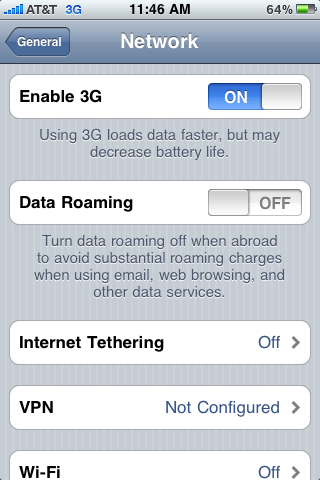 On your phone, turn OFF data roaming BEFORE you leave the country or board a cruise ship. On the iPhone, this option can be found under the “Network” panel of the “General” section of the “Settings” application. On other phones, this setting may be much harder to find.
If you forget to disable data roaming, your phone may be silently pulling down email updates and racking up a huge bill without you even touching it. Be especially wary on cruise ships – the “cellular aboard” plans have burned many travelers who never even take their phones out of their luggage. Turn your phone off before the ship leaves port!
If you know that you will need wireless data during a trip, call your phone company in advance to confirm the rate, and to ask about special international data plans. If you have an unlocked GSM-compatible phone, you may also be able to purchase a local SIM card and vastly cheaper data plan in whatever country you are visiting.
And if you have a data card for your laptop, don’t even think about using it abroad unless you are certain about what charges you might face. A laptop can burn through data MUCH faster than any phone, and you could literally spend thousands of dollars before you even realize it. Your best bet is to seek out WiFi and to get online that way.
Think about it. TEN THOUSAND DOLLARS. In a bit over an hour.
It could happen to you.
Consider yourself warned.
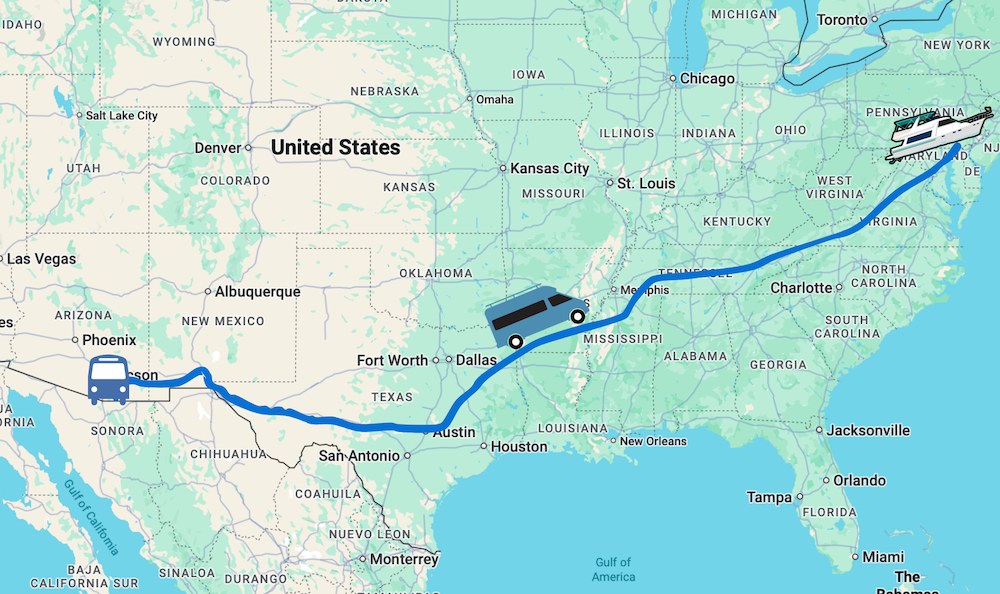
Another thing that I unpleasantly discovered while camping in Big Bend, is that AT&T advertises “unlimited domestic data” but id not quite true…
While in Terlingua TX, I received a text message form AT&T stating that I have exhausted my 24MB monthly allowance for “Off Network” data usage. (?? WTF??) “Off Network?” All this time, my iPhone displayed that I was -in- and AT&T network. I have traveled to places where I can see that I have entered another carrier’s area…this was not the case.
Well, long story short, after calls, emails and texts with At&T, it turns out that At&T uses other carrier’s towers to extent their already small network. When this happens you are “off network”. To “help me” know when I am “off network” AT&T updated my iPhone over the air (yikes!) with an “Off Network” status label.
All this crap would be somewhat fine if AT&T would let iPhone users -up front- about this…AT&T promotes the iPhone as with “unlimited data usage” for $30/mo
to find more about this just google:
“Excessive Domestic Off-Network Data Usage”
.-= Adolfo Isassi´s last blog ..2010-03-11, a date which will live in infamy… =-.
Adolfo – I had the same thing happen while in the Yosemite area last summer. I was just surfing away on my iPhone, and got the dreaded text message. They also switched my network indicator to show when off-network. I’ve been horrified now to know just how often AT&T is not the carrier, and how often I really don’t have unlimited data.
It’s quite devious of them to not be transparent with just how small their network is by defaulting to always showing ‘AT&T’ as the network you’re on – when you’re really not.
I’m so paranoid about this happening that I not only turn off data roaming, I turn off location services, push notifications, pretty much anything I could possibly use data for. Actually most of the time when I’m traveling my iPhone is essentially a touch, I put it on airplane mode and turn the wifi back on. It’s nice to have in a pinch, and I have made calls abroad, but luckily I don’t need to be reached faster than email most of the time.
There should really be a way to put a cap on roaming data or something to keep people blowing $10k on net surfing!
.-= Mark Tisdale´s last blog ..New York Skyline =-.
One thing you can do to guarantee that you will not inadvertently use up and data while traveling is to remove the SIM card from your phone entirely.
Just make sure that you don’t lose it!
Crikey! Just reading about having a $10,000 bill sends me in to a panic!
I remember, years ago when we had SWB(now AT&T)as our home phone carrier, and we had a $300 limit on our long distance calls.
Imagine our surprise, when we got a phone bill for $2,000+ when my wife made a few emergency calls to Pakistan. We simply refused to pay it. We had put a limit there for a reason. They disconnected our phone line, and we went mobile. I will never do business with AT&T.
.-= Rasheed Hooda´s last blog ..Meet Brooke Ferguson, The Business Backpacker =-.
wow that’s amazing story and a lot of money for a phone bill. Good tips. thanks for sharing!
We recently made the mistake of my husband calling me on his cell phone while I was in Thailand using a phone card. We just forgot that we only had 700 minutes per month. We were charge .45/ minute for 150 minutes that went over. Ouch!
.-= GotPassport´s last blog ..Why Chiang Mai Is Our Home! =-.
That sucks.. but at least your phone carrier is quite upfront about how many minutes you’ve purchased, and they give you ways to check them fairly easily. That’s is one thing I do appreciate about AT&T and their roll-over minutes. At present time, I have about 4000 minutes banked up (we hardly ever talk on the phone). It’s nice to know that if something came up and we needed to use our phones a lot – we have the stored up minutes to not worry about it.
I wish we could send you some of our roll-over minutes to cover your overage charges!
I love roll over minutes…. I just wish this also applied to text messages.
Ah well.