
In May I took a close look at the MacBook 12v power supplies offered by Mikegyver.com – and at first I came away extremely impressed.
To recap, here are some quotes from our initial review:
One particular frustration that has vexed me for over three years now is that there is no ”official” way to power any MagSafe-equipped Apple laptops directly off of 12v power. As full-time technomads living in a small solar-powered trailer, we have ample access to 12v DC, while 120v AC is a rare luxury for us. Sure, we could use an inverter — but (as you will see) that inserts a lot of overhead and inefficiency. We would much rather run our lives directly off of 12v as much as possible.
…
We checked out the (Mikegyver modified) Kensington All-In-One, and it has quickly become one of the most indispensable items in our technology arsenal. We have been particularly thrilled with no longer needing to power up our DC-to-AC inverter to power our laptops.
Our love of the Kensington soon faded however, as we discovered the downside of one of the All-In-One’s features – the dreaded low-voltage cutoff.
Low-Voltage Cutoff – More Bug Than Feature:
To protect you from draining and damaging your vehicle battery, the Kensington power supply automatically shuts down (and stays shut down) whenever its input voltage drops below 12 volt. At first glance, this seems like a smart thing to do – a battery bank that is reading less than 12 volts has already been 50% drained. (And ideally, you should never drain most vehicle batteries below 50%!)
But… Things aren’t always that simple.
If you are drawing a lot of current out of a battery (such as when you are charging a depleted laptop), it will register a lower voltage even if it has not been drained nearly that far yet. And if you have a long relatively thin gauge wire between your battery and your 12v jack (which is very common), this voltage drop will be even further exaggerated.
In our case, trying to charge a drained MacBook Pro off of even 75% charged RV batteries would sometimes draw too much current and trigger the Kensington power supply to shut down.
It was extremely frustrating – the Kensington became useless to us at the very time that we needed the increased power efficiency it offered the most.
And though most car batteries will suffer damage if drained below 50%, the true deep-cycle batteries used in solar and RV setups like ours can handle up to an occasional 80% discharge without problem. We hated being prevented from fully taking advantage of our off-grid electrical system.
For our needs, the Kensington increasingly kept failing to live up to our expectations.
iGo Everywhere:
Fortunately – when he realized the nature of the problems we were having, Mike of Mikegyver.com sent us an iGo Everywhere130 power supply to try as an alternative. It worked wonderfully.
NOTE: The iGo Everywhere130 is an older model than the iGo EverywhereMAX linked to above. The primary difference is that the EverywhereMAX is physically smaller.
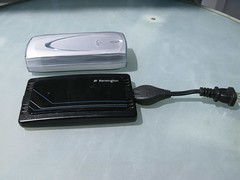
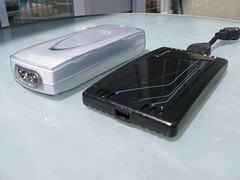
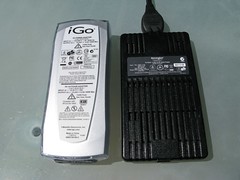
The iGo Everywhere130 is significantly chunkier than the Kensington All-In-One, and it weighs twice as much. But… It doesn’t cut out when voltages drop – which makes it vastly better suited for some types of use.
Mikegyver currently offers both the Kensington All-In-One and iGo EverywhereMAX modified to support Apple’s proprietary MagSafe power connector for $229. Normally Mikegyver steers customers towards the Kensington because “the Kensington is lighter and slimmer”. Though the EverywhereMAX is reportedly smaller than the Everywhere130 we were testing, I can imagine that the small size of the Kensington is indeed a better option for a road warrior who needs to carry a go-anywhere power supply with them all the time.
But if you are planning to run off of deep-cycle batteries or solar, do NOT get the Kensington!
We have been using the iGo Everywhere130 for the past month, and we have been extremely pleased with it. Testing it head-to-head against the Kensington All-In-One, it was easy to create situations where the Kensington would shut off (and not come back until it is physically unplugged and plugged in again) while the iGo just kept on charging.
Just like the Kensington, the iGo is a combination AC & DC power supply that can power your laptop off of traditional wall current, a car power jack, or an airline power jack. They both have a minimal 0.1A no-load current draw, meaning that it can be left plugged in all the time without fear. The iGo and Kensington seemed to perform equivalently while charging too – both offering up overall power consumption vastly lower than if we had to power up our inverter to use Apple’s AC power supply.
Conclusion:
If you need to run an Apple laptop off of solar or deep-cycle batteries, the iGo Everywhere offered by Mikegyver is a great way to do it. If you just need to charge your laptop in an airplane or your car while in transit, the smaller and sleeker Kensington All-In-One is the way to go.
There are other emerging alternative however… The comment thread (37 comments and counting!) for my previous post has generated some “spirited” discussion, with representatives from HyperMac and Power My Mac both espousing the benefits of their own MacBook 12v power supplies.
We’ve gotten in a Hypermac power supply that we are testing now, and hopefully we will get a Power My Mac supply to throw into the mix soon too.
It wasn’t long ago that it seemed as if there were no alternatives for powering an Apple laptop off of 12v. Now there are options galore. In a future post, I will try and dissect the tradeoffs between them all.
February 2010 Update: Our Mikegyver iGo Everywhere has bit the dust as of a couple months ago. Currently, it’ll run our laptops but not charge them. Our Mikegyver lasted less than 6 months of usage, which we don’t find all too impressive. Our HyperMac however is still running like a champ. And yes.. a review of the HyperMac is overdo. Perhaps someday. Power My Mac never followed through with a review unit.

Thanks Chris,
I’ve been using the Mikegyver iGo with my Macbook Pro off-the-grid for a few weeks now and it works great.
Yeah, one of the biggest annoyances so far is the low-quality 12V/automotive connectors out there, they are often too thin, or don’t make good connections, and often come with very low-amp fuses. Would be nice to find a source of really good quality 12V sockets and splitters.
But it’s great running direct off 12V and avoiding the inverter entirely. I use the “Doc Wattson” RV/Marine power meter too and it’s really handy: tells me at a glance how much power I am drawing and the voltage level of the batteries:
http://www.rc-electronics-usa.com/ammeters/rv-battery-monitor.html
Do you know of any good ‘off-the-grid’ forums out there? I appreciate your blog sharing this info, would be nice to have some kind of discussion forum for these kinds of setups.
Chris,
What are the symptoms of your iGo dying? I’ve been using mine for about 4 months, and today the light on the magsafe tip has started to flash on and off very fast, and sometimes goes green and stops charging the battery for short periods. Were these similar to your experience? I hope these aren’t the death spasms of my iGo.
Keith
Thanks for the review! I am looking for a 12V adapter for off-the-grid living and did not know about the low-voltage cutoff. I’ve experienced the same thing with inverters that cut off or start beeping, when you know that the batteries aren’t that low. Phew. That saved me some trouble, thanks. Would love to hear a HyperMac Car Charger review.
Keeth —
One extra tip regarding dealing with a Low Voltage Cutoff…
Often because the wire gauge heading to most 12v jacks is so narrow, a lot of the observed voltage drop is caused by the wire heating up. If you use thick wires and hook the inverter directly to a battery, it will take a lot longer to reach the cutoff point and trigger the annoying beeping.
Chris & Cherie,
What a great site — I have learned a lot and will continue to.
I’m hoping you will be able to review the HyperMac Car Charger soon as I am about to take a Macbook on the road.
Thanks for what you do,
Doug
I use this https://powertraveller.com/iwantsome/primatepower/minigorilla/ when I’m on the road with the bike – the mini gorilla also powers pretty much everything else I carry with me. However – I did think I could just buy this (http://store.apple.com/us/product/MB441Z/A?fnode=MTY1NDEwMQ&mco=MjE0ODI2OQ) – Apple Magsafe Airplane adaptor – which has a look’a’like 12v car socket on it…. but doesn’t actually work with the 12v car socket…. that was a waste of cash.
m
Yep – airlines actually put out a higher voltage than cars do. Apple’s adaptor doesn’t contain any sort of fancy electronics to do DC-to-DC conversion, it just passes the power through and the laptop can run off that lower voltage, but not charge. Car voltage on the other hand is too low to even power a MacBook.
Apple’s adaptor is really a waste, and should be avoided.
The MikeGyver and HyperMac solutions are MUCH better.
Chris,
Sorry about that, we’re planning on updating our website with much more details and even perhaps a video on the plus/neg of each product.
But to your question, yes, the iGo everywhereMAX and iGo 130w AC/DC is the same except for the new size. The dims are actually the same as the Kensington except that it is still a bit thicker.
Thanks,
Mike
mikegyver.com
Chris,
small minor comment. We sent you the iGo 130w ac/dc adapter. But the iGo everywhere max is almost the same as the 130w except the it is almost as small as the Kensington. So we we debating if we should switch favorites now. Regardless our adapter can be power from any source and not just DC.
Mikegyver.com
Hi Mike –
Sorry for the confusion – I’ll update this post to fix the iGo details and to make clear this was an Everywhere130 and NOT an EverywhereMAX we were evaluating.
You only offer one iGo model on your site, and the way you describe the difference with the Kensington is to say: “the Kensington is lighter and slimmer” without giving more details. Even the (horrible to navigate) iGo website only mentions the existence of the EverywhereMAX. I didn’t realize until now that the Everywhere130 was actually a different / older product.
Is the EverywhereMAX and Everywhere130 identical in every way other than size?
– Chris