
[wp_campaign_3] As Technomads, Cherie and I depend on mobile data – it is our lifeline to the world. For the past two years our primary connection has been through Sprint, and for the most part we have been happy with the speed and coverage we have gotten from our EVDO rev A capable data card.
A primary reason we picked Sprint over Verizon was because Sprint was offering “unlimited” data, and Verizon at the time had redefined “unlimited” to equal 5GB and had begun kicking off users who exceeded this.
Soon Sprint followed in Verizon’s footsteps and also mandated a 5GB usage cap. And in the past year, both Sprint and Verizon have started to charge overage fees for anyone who dares cross this 5GB limit.
On both services, your first 5GB is $59/month. On Sprint, each additional gigabyte is $50. On Verizon – each gigabyte of additional usage is an insane TWO HUNDRED AND FIFTY DOLLARS. Things are even worse on AT&T – their current overage charge adds up to $480 dollars per gigabyte!
When Verizon first announced these overage charges last year, I worked out that a single mouse click within iTunes to purchase a TV series could easily cost you over $2000 if you happened to be using the Verizon network. Outrageous!
Even though our contract with Sprint remains grandfathered in with the original terms, we have grown very conscious of our data usage and strive to keep under 5GB every month. It isn’t always easy, but we manage.
But now Sprint has progressed even further in limiting how their customers use their service. The newly released SmartView 2.22 driver upgrade came with no release notes and no apparent new features, but once you install it Sprint has the gall to actively prevents you from using the built in connection sharing feature in Mac OS X.
Trying to share a connection now results in this error message:
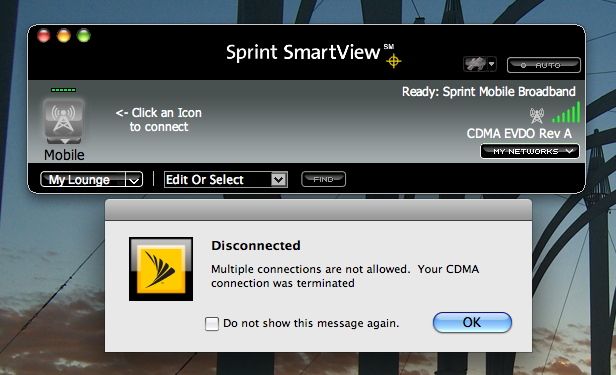
We have always used data connection sharing to allow both Cherie and I to work online at the same time. It is simple and works fabulously. But Sprint’s latest upgrade is now actively preventing us from doing so.
The new SmartView software even disconnects your EVDO connection if you make a local WiFi connection to another device, even if you are just trying to talk to a WiFi connected printer or iPhone!
Fortunately, Mac OS X has built in driver support for many EVDO cards – including the Novatel EX720 that we use. When using the Apple-provided driver, things continue to work as normal. On Cherie’s laptop we had never bothered to install Sprint’s SmartView drivers, and her computer is still able to connect, share data, and use WiFi just fine.
On mine however, sharing is blocked… Now I need to look for a way to safely roll back to an earlier Sprint driver, or to remove the Sprint driver entirely and revert back to the OS-provided default.
Fortunately, we have this option. Some newer EVDO cards are not supported in the OS, forcing you to use Sprint’s SmartView.
[wp_campaign_1]If you can avoid using the Sprint SmartView drivers – I encourage you to do so. The only advantage that the Sprint driver ever provided was that you could use your data card as a GPS…
We often however don’t even plug our Sprint card into our laptops, instead using a Cradlepoint CTR-350 router to create a WiFi hotspot. The CTR-350 still works fabulously, and continues sharing like a champ.
Sprint even directly sells and officially supports other models of EVDO to WiFi routers that exist specifically to allow for multiple computers to share a single EVDO data connection. How on earth can Sprint justify selling some devices that are made for data sharing, while at the same time they are “upgrading” their drivers to prevent laptops from being able to do this?
It doesn’t make any sense. But then again, in my long years working in the mobile industry, I have learned that “making sense” is rarely a priority for mobile operators.
*sigh*
UPDATE: A tip on the EVDOforums has shown me a way to re-enable sharing in the new SmartView 2.22 drivers. Sprint has now tucked away a new undocumented “Allow Simultaneous Connections” setting in the hardware preferences pane, defaulting to off. You can see the relevant setting here:
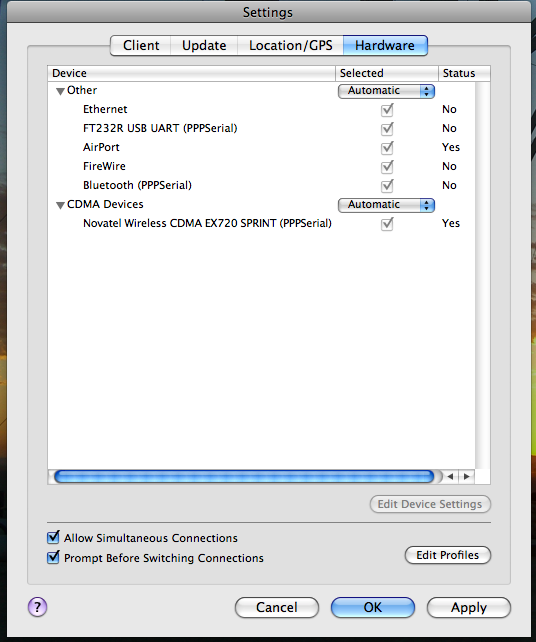
It sure is nice of them to document this rather critical change!
I wonder if this is just the first step towards blocking sharing entirely?
I am using Smartview 2.4.0043 with the U301 3G/4G device with an iMac OS10.6.6. It is a bit frustrating. According to the coverage map my 4G connection should work fine. It disconnects often. Even 3G discoonects at times. I often have to restart the software. Sometimes I have to reboot my whole system. Smatview has a check for updates feature, but it doesn’t seem to work. I started with v 2.28 and checked for updates and got nothing even though v 2.4 was available. Also, I use a second screen, but I am not able to drag the Smartview window to my second screen. I’m not very impressed with sprint
I believe the intent of this feature was not for harm, but instead for security. Having two wireless connections open at the same time can open security concerns for corporate and home networks. The ability for the user to turn off this feature by allowing simultaneous connections can allow users who would still like to share their access work.
Thank you so much for the UPDATE you saved my ass. I was using the glitchy Sierra Wireless Watcher Lite from the downloads section of the Sprint site. It effectively shared my connection but has been constantly crashing lately. No more of that!
Thank, for this review on the SmartView download. Thank God I did not run the exe. program to install it. I was under the impression that it would make my air card more reliable and faster. I guess I was wrong. Thanks again and I bookmarked your site for future reviews.
YOU ARE “DA BOMB”!!! I’ve been trying to resolve this issue for MONTHS. My VPN would not work with my Sprint card and I was so frustrated. In fact, had to UNINSTALL my VPN for it to even work. So, it’s not like I could just switch in on when I was on WiFi and off when I was on Sprint. Then.. VOILA! I did a search out of the blue and found your “update” tip. Now.. the key is to prevent SmartView from updating itself!
Thanks!
Thanks for the tip, I don’t use Mac, but do use sprint mobile. I am grandfathered in as well, and ditto on watching the monthly bandwidth. I use internet connection sharing with windows on my laptop to share my PCMCIA broadband connection to my router and my linux box. I have not updated any drivers in awhile… so in reading this I think I’ll avoid updating them till forced too. I cloned the mac address of my laptop with my linksys wireless router, and connect the linux box to my network and the laptop’s Lan port to my routers Wan port. So far so good. The routers wireless services work like this as well.
Chris, I guess that this may be one of the tactics that will arise from the Verizon/Alltel purchase, to eliminate Alltel’s unlimited EVDO rev A users. Thanks for the heads up. We’ll be looking out for such a move.
Alltel was the last bastion of real unlimited mobile data, but now that Verizon has taken over that option is gone now.
Anyone with a current Alltel contract should be grandfathered in, but I expect Verizon to eventually proactively start to drop the heaviest users. They can’t charge you an overage, but they can drop you for anything the chose to label as “excessive use”.
Sucks, huh?
– Chris
We are full-timers and I use Verizon and got clipped for usage last month. Ouch!!! This month I came in under but it was a stark lesson. I lost usage for about a week last month, just couldn’t afford the $250 a gig. Your blog is awesome.
I wouldn’t mind at all if their overage charges were fair and reasonable. $25 a gig sounds more reasonable, but $250 a gig is highway robbery.
Particularly considering that your first 5 gigs are just $12 each, there is no way to justify charging $250 for your sixth.
– Chris
I’d also be very happy if they put limits on bandwidth use during peak hours, and had more liberal limits (or no limits) on off peak hours. Much like how most plans handle voice minutes. I’d have no problem doing my more bandwidth intensive stuff (OS updates, video uploads, downloading iTunes content, etc) overnight.
I love this site 🙂 so glad i found you guys!
I think this sprint thing sucks, plain and simple. In australia (where I am) it is much the same. WIFI is quite simply exorbitant for such a small amount of data usage. I can’t wait until WIFI connectivity is cheaper.